When Does a Hospital Website Redesign Put SEO at Risk? Reading the Redirect Map, the Five Steps and the Sample Traffic Recovery
A question-and-answer guide to protecting SEO during a hospital website redesign or migration: why traffic drops, 5 steps from a benchmark to post-launch monitoring, a risky vs protected table, a sample traffic-recovery graph, cautions and FAQs.

Healthcare website migration SEO is the planning and testing that keeps your search visibility intact when you redesign your site, change platforms, move to a new domain or rebuild your page structure. A new site can look better and still lose most of its organic traffic if old URLs are not redirected, page content is thinned out or key pages disappear. For a hospital or clinic, that means fewer patients finding you through search. This guide explains, in a question-and-answer format, how to protect SEO in a redesign in five steps, with a sample result and a pre-launch checklist. It uses organic methods only.
Key Findings
- 5 steps protect SEO in a redesign: inventory and benchmark, a redirect map, content and template parity, pre-launch testing and post-launch monitoring.
- In the illustrative model below, organic traffic after launch recovers from 58% to 104% of its pre-launch level when all five steps are in place.
- A redirect map protects the most in the sample, because every old URL that fails to point to a new page loses its history and its visitors.
- 4 numbers are enough to track progress: organic clicks, indexed pages, redirect errors and appointment requests from organic search.
- All figures in this article are illustrative examples, not guaranteed results.
What Is Healthcare Website Migration SEO?
It is the process of moving a site without losing what search engines and patients already know about it. It covers old and new URLs, page content, titles and headings, internal links, structured information, indexing settings and local details. It builds on the structure principles in our guides to website architecture for multi-location hospitals and small hospital website blueprints.
Why Do Redesigns Cause Traffic Drops?
Most drops come from small, avoidable mistakes made at launch. Common causes include:
- Old URLs are not redirected to matching new pages, so they lead to error pages.
- Pages that bring organic visits are merged, shortened or removed without a plan.
- Titles, headings and internal links change, so search engines see different pages.
- A test setting that blocks search engines stays on after launch.
- Provider, location and insurance pages lose details that patients and listings depend on.
How Can Hospitals Protect SEO During a Redesign? 5 Steps
1. Take an Inventory and Set a Benchmark
Know what you have before you change it. List every page, its URL, its organic clicks and its role, and record your baseline in Google Search Console and your analytics. A full healthcare SEO audit before the project shows which pages must be protected.
2. Build a One-to-One Redirect Map
Every old URL needs a clear destination. Match each old page to the closest new page, use permanent redirects and avoid sending everything to the home page. Include location, provider and service pages, and plan for openings, moves and closures, as covered in our guide to multi-location changes.
3. Keep Content and Templates at Parity
A new design should not mean less useful content. Carry over the text, headings, title tags, meta descriptions and internal links of your best pages, and keep provider pages and FAQ content complete. Use the template approach from our guide to titles at scale.
4. Test Before Launch
Use a checklist on the staging site. Check redirects, page titles, headings, mobile layout, speed, forms, booking links and that search engines are allowed to index the new site after launch. Review accessibility and check that tracking tools follow your privacy rules.
5. Monitor Closely After Launch
The first weeks decide how fast traffic recovers. Watch clicks, indexing and error reports daily at first, then weekly, and fix broken redirects and missing pages quickly. Check that your Google profile and local listings point to the right new pages.
| Step | Risky redesign | Protected redesign |
|---|---|---|
| Preparation | No baseline | Page inventory and traffic benchmark |
| URLs | Old links lead to errors | One-to-one permanent redirect map |
| Content | Thinner, reworded pages | Content and template parity for key pages |
| Testing | Launch and hope | Staging checklist with indexing and booking checks |
| After launch | No monitoring | Daily then weekly checks and quick fixes |
How Much Traffic Can a Migration Plan Protect? A Sample Graph
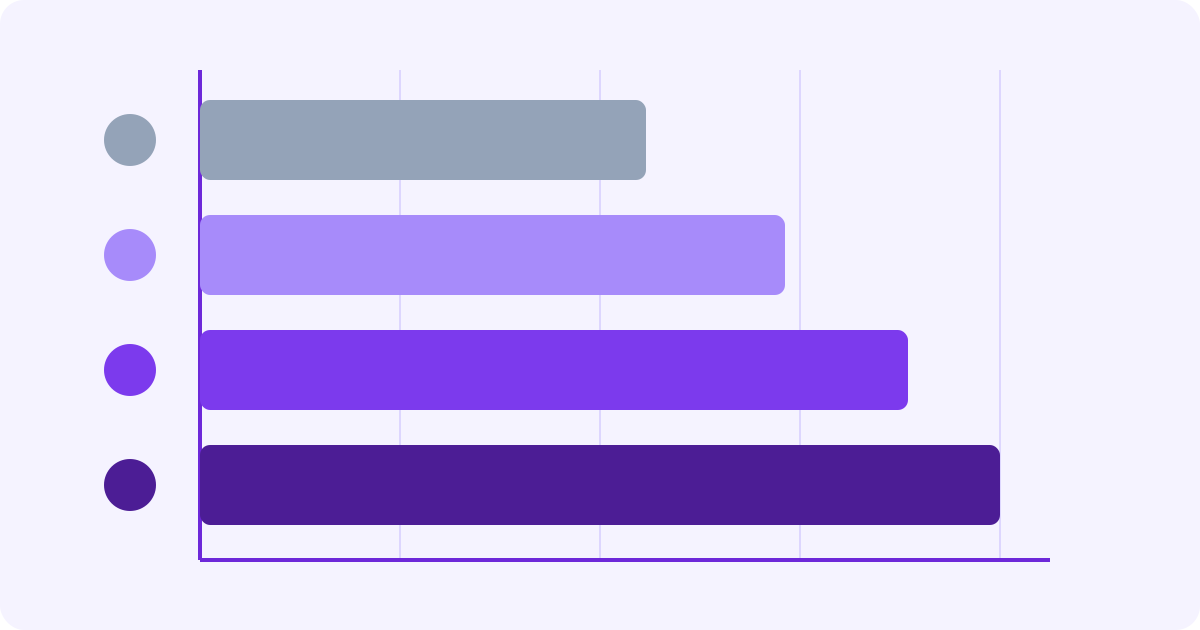
In this illustrative example for a four-location hospital group, organic traffic after launch moves from 58% to 104% of its pre-launch level. The bars run from top to bottom in the same order as the table below, and each block (█) equals about 7 percentage points.
| Stage | Organic traffic after launch (% of before) | Bar chart |
|---|---|---|
| No SEO plan | 58 | ████████ |
| Plus a redirect map | 76 | ███████████ |
| Plus content and template parity | 92 | █████████████ |
| Plus pre-launch tests and post-launch monitoring | 104 | ███████████████ |
What Should Hospitals Measure After a Redesign?
Four measures show how well the move went.
- Organic clicks compared with the same weeks before launch.
- Number of key pages indexed and number of error pages found.
- Percentage of old URLs that redirect to a correct new page.
- Organic appointment requests and calls, tracked with booking page conversion.
What Rules and Cautions Apply?
A redesign touches patient-facing pages, forms and tracking, so privacy needs care.
- Check that new forms, scripts and analytics follow HIPAA and your privacy policy before launch.
- Keep the privacy policy, accessibility statement and clinical review dates visible.
- Do not remove medical content without clinician review, and do not publish unreviewed new claims.
- Protect staging sites with a password so patient information and unfinished pages are not exposed.
- Keep a rollback plan in case of serious problems at launch.
Methodology and Limitations
The numbers in this article come from an illustrative model created by Nova Reach Digital to show how each step may affect traffic after a redesign. They are not drawn from a published study or a specific site, and no one can guarantee traffic recovery. Results depend on the size of the change, content quality, site health and competition. This article is general information and not legal advice.
Related Reading
- Specialty clinic site architecture
- Internal linking at scale for health systems
- Hub, spoke, book internal linking
- Healthcare E-E-A-T
- Healthcare link building
Conclusion
A redesign should improve the patient experience without hiding the site from search. Benchmark first, map every redirect, keep your best content, test before launch and watch closely afterwards. If you want help protecting SEO in a website redesign, contact Nova Reach Digital or read more about our healthcare marketing services.
Get Directions
Frequently Asked Questions
Keep reading
What Are the Top Email Marketing Automation Tools for Small Businesses? Reading the Tool Comparison, the Five Steps and the Sample Email Bookings
A question-and-answer guide to choosing among the top email marketing automation tools for small businesses: what they do, why programs underperform, 5 steps, a weak vs stronger table, a sample bookings chart, rules and FAQs.
What Are the Top Social Media Automation Tools for Small Businesses? Reading the Tool Comparison, the Five Steps and the Sample Posting Time
A question-and-answer guide to choosing among the top social media automation tools for small businesses: what to automate, why accounts feel robotic, 5 steps, a weak vs stronger table, a sample time-savings chart, rules and FAQs.
How Do You Choose Among the Top Digital Marketing Agencies in NYC? Reading the Agency Types, the Five Steps and the Sample Cost Per Customer
A question-and-answer guide to choosing among the top digital marketing agencies in NYC: what agencies do, why businesses switch, 5 steps to choose, an agency-types table, a sample cost-per-customer chart, rules and FAQs.
Put These Ideas to Work with NovaReach
Automate your marketing, launch AI voice agents, and keep every lead moving, all from one dashboard.