How Do Automated Prescription Refills Save Staff Time? Reading the Request Flow, the Five Steps and the Sample Handling Times
A question-and-answer guide to prescription refill automation: why refills take so long, 5 steps from online request to pharmacy status updates, a manual vs automated table, a sample handling-time graph, metrics and FAQs.

Prescription refill automation is a workflow that receives refill requests online, checks them against clinic rules, routes them to the right clinician for approval and sends the order to the pharmacy with a status update to the patient. Refill requests are among the most repeated tasks in a clinic. Each one starts as a phone call, a voicemail or a portal message, and then moves between staff members before a clinician signs it. This guide explains, in a question-and-answer format, how automation shortens that path while keeping the clinician in control.
Key Findings
- 5 steps cover the refill journey: online request, rule-based screening, clinician approval queue, pharmacy transmission and patient status updates.
- In the illustrative model below, staff handling time per request falls from 8 minutes to 2 minutes when all five steps are active.
- Rule-based screening saves the most time in the sample, because most requests are routine and only need a quick clinician review.
- 4 numbers are enough to manage refills: requests per week, handling time, turnaround time and calls about refill status.
- All figures in this article are illustrative examples, not guaranteed results. Clinical decisions always stay with the clinician.
What Is Prescription Refill Automation?
It is a system that structures every refill request so that staff do not need to ask the same questions again and again. The patient selects the medicine and pharmacy, the system checks the last visit date and the clinic's refill rules, and the request lands in a clinician's queue with the information needed to decide. Approved requests are sent electronically, and the patient is notified when the pharmacy receives them.
Why Are Refill Requests So Time-Consuming?
The time goes into collecting information and passing the request between people. Typical causes include:
- Requests arrive through calls, voicemails, faxes and messages in different places.
- Staff must look up the last visit, the dose and the pharmacy every time.
- Patients who are overdue for a visit are not flagged.
- Clinicians approve requests in between appointments, so turnaround is unpredictable.
- Patients call again to ask whether the request was sent.
How Can Clinics Automate Prescription Refills? 5 Steps
1. Let Patients Request Refills Online
One digital form replaces calls and voicemails. The patient picks the medicine, confirms the pharmacy and answers a few safety questions. Offering the form in the patient portal and through a hospital chatbot makes it easy to find at any hour.
2. Screen Requests With Clinic Rules
Simple rules separate routine requests from those that need attention. The system can check when the patient was last seen, whether labs are due and which medicines need a clinician conversation first. Overdue patients are prompted to book through automated appointment scheduling.
3. Give Clinicians a Single Approval Queue
A clean queue lets the clinician approve, change or deny each request in seconds. Each item shows the history, dose and last visit. Notes from automated clinical documentation are available in the same view, so the clinician does not need to open several screens.
4. Send the Order to the Pharmacy Electronically
Electronic transmission removes faxes and phone calls to the pharmacy. Approved refills go straight to the patient's chosen pharmacy, and the system records the date and time. Hospitals with their own pharmacy can link this step to pharmacy inventory automation so stock is ready.
5. Keep Patients Informed at Every Stage
Short status messages stop repeat calls. The patient sees "received," "approved" and "sent to pharmacy," and gets a reminder to book a check-up when needed. These messages fit with your automated patient follow-up messages, and patients on chronic care can be supported by remote patient monitoring.
| Step | Manual way | Automated way |
|---|---|---|
| Request | Calls, voicemails and faxes | One online form in the portal or chatbot |
| Screening | Staff look up the history by hand | Rules check last visit and lab dates |
| Approval | Paper notes passed between staff | Single clinician queue with full context |
| Pharmacy | Fax or phone call | Electronic transmission with a time stamp |
| Status | Patient calls to ask | Automatic status messages |
How Much Time Can Automation Save? A Sample Graph
In this illustrative example for a primary care clinic, staff handling time falls from 8 to 2 minutes per request. The bars run from top to bottom in the same order as the table below, and each block (█) equals 1 minute.
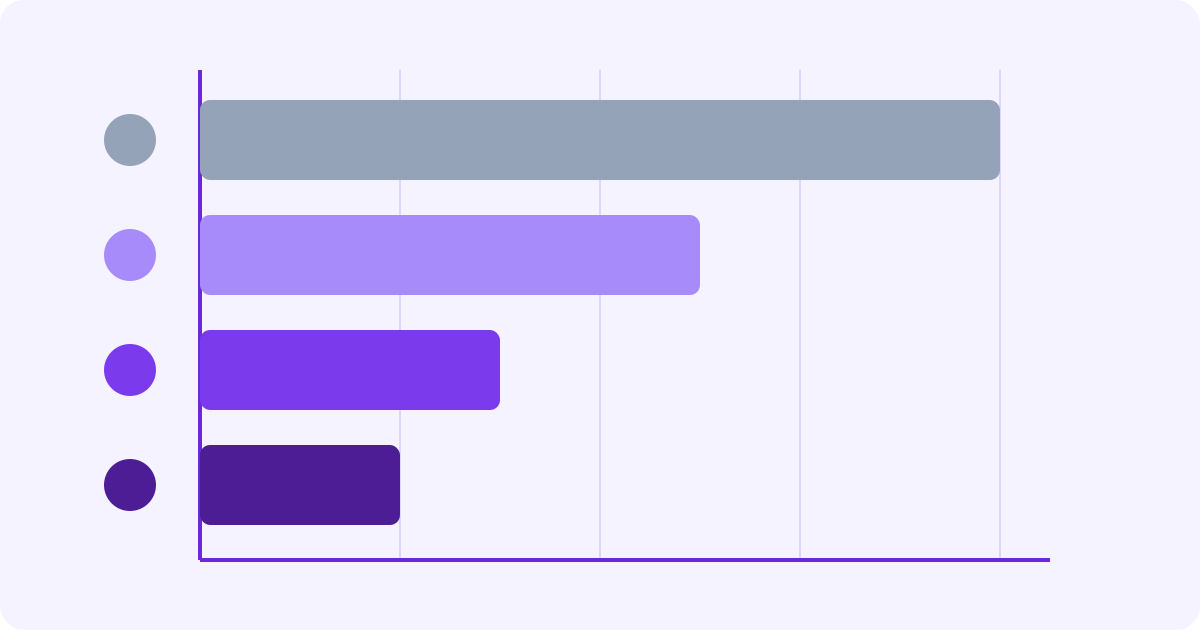
| Stage | Staff minutes per request | Bar chart |
|---|---|---|
| Phone and paper | 8 | ████████ |
| Plus online request form | 5 | █████ |
| Plus rule-based screening | 3 | ███ |
| Plus clinician queue and electronic sending | 2 | ██ |
What Should Clinics Measure for Refills?
Four measures show whether the process is faster and safe.
- Average staff minutes per refill request.
- Average hours from request to pharmacy transmission.
- Number of calls asking about refill status.
- Percentage of refill requests that were flagged for a required visit or lab.
Is Refill Automation Safe?
Yes, when the clinician makes every clinical decision. Keep these rules in mind:
- Automation can prepare and route requests but should never approve a prescription on its own.
- Require extra review for controlled substances and follow federal and state rules, including electronic prescribing requirements.
- Verify the patient's identity and pharmacy before sending any order.
- Keep an audit log of who requested, reviewed and approved each refill.
- Keep a phone option for patients who cannot use online tools.
Methodology and Limitations
The numbers in this article come from an illustrative model created by Nova Reach Digital to show how each step may affect refill handling time. They are not drawn from a published study or a specific organization. Real results depend on the clinic's size, patient mix, EHR and pharmacy connections. This article is general information about workflows and is not medical or legal advice.
Related Reading
- Pharmacy and inventory automation
- Automated patient intake
- Denial management automation
- Provider credentialing automation
- OPD queue and token management
Conclusion
Refill automation does not remove the clinician from the decision. It removes the phone tag, the lookups and the repeat calls, so clinicians review requests faster and patients know where their medicine stands. If you need a refill workflow for your clinic or hospital, contact Nova Reach Digital or read more about our healthcare automation services.
Get Directions
Frequently Asked Questions
Keep reading
What Are the Top Email Marketing Automation Tools for Small Businesses? Reading the Tool Comparison, the Five Steps and the Sample Email Bookings
A question-and-answer guide to choosing among the top email marketing automation tools for small businesses: what they do, why programs underperform, 5 steps, a weak vs stronger table, a sample bookings chart, rules and FAQs.
What Are the Top Social Media Automation Tools for Small Businesses? Reading the Tool Comparison, the Five Steps and the Sample Posting Time
A question-and-answer guide to choosing among the top social media automation tools for small businesses: what to automate, why accounts feel robotic, 5 steps, a weak vs stronger table, a sample time-savings chart, rules and FAQs.
How Do You Choose Among the Top Digital Marketing Agencies in NYC? Reading the Agency Types, the Five Steps and the Sample Cost Per Customer
A question-and-answer guide to choosing among the top digital marketing agencies in NYC: what agencies do, why businesses switch, 5 steps to choose, an agency-types table, a sample cost-per-customer chart, rules and FAQs.
Put These Ideas to Work with NovaReach
Automate your marketing, launch AI voice agents, and keep every lead moving, all from one dashboard.