How Does Insurance Eligibility Verification Automation Prevent Rejected Claims? Reading the Check Flow, the Five Steps and the Sample Rejection Rates
A question-and-answer guide to insurance eligibility verification automation: why coverage errors cause rejections, 5 steps from capture to re-check, a manual vs automated table, a sample rejection-rate graph, metrics and FAQs.

Insurance eligibility verification automation is a workflow that checks a patient's coverage, plan details and benefits electronically before the visit and flags problems while there is still time to fix them. A single wrong policy number or an inactive plan can turn a clean visit into a rejected claim and an unhappy patient bill. Many front desks still verify coverage by phone or by logging in to several payer sites, one patient at a time. This guide explains, in a question-and-answer format, how automation moves that check earlier, makes it faster and reduces rejected claims.
Key Findings
- 5 steps cover the verification cycle: insurance capture at booking, automatic coverage check, benefit summary, exception alerts and re-checks before the visit.
- In the illustrative model below, eligibility-related claim rejections fall from 7% to 2% when all five steps are active.
- Checking at booking, not at check-in, gives the practice days to fix problems instead of minutes.
- 4 numbers are enough to manage verification: percentage of visits verified in advance, rejections for eligibility, time spent per check and patient balances collected at the visit.
- All figures in this article are illustrative examples, not guaranteed results.
What Is Eligibility Verification Automation?
It is software that sends an electronic coverage inquiry to the payer and returns the answer in seconds. The system reads the response, shows whether the plan is active, what the copay and deductible are and whether the service needs authorization. Staff then handle only the exceptions instead of checking every patient manually.
Why Do Eligibility Problems Cause Rejected Claims?
Most eligibility denials start with information that was wrong or old when the patient arrived. Typical causes include:
- Insurance details are copied incorrectly from a card or a phone call.
- The patient changed plans or lost coverage since the last visit.
- Verification happens at check-in, when it is too late to resolve issues.
- Staff skip checks on busy days, so some visits go unverified.
- Benefit details, such as copays and authorization needs, are not shared with the patient or the billing team.
How Can Practices Automate Eligibility Verification? 5 Steps
1. Capture Insurance Details When Booking
Accurate details at the start prevent most later errors. A digital form with a card photo upload and required fields collects the data once. This follows the same approach as automated patient intake and works well with automated appointment scheduling.
2. Run an Automatic Coverage Check
The system checks eligibility electronically as soon as the visit is booked. It records the response, date and plan information in the patient's record, with no manual login to payer sites.
3. Show a Clear Benefit Summary
Staff and patients should see the numbers that matter in one place. The summary shows copay, deductible status and whether the service requires approval. If authorization is needed, the case moves to your pre-authorization automation workflow right away.
4. Alert the Team About Exceptions
Exception alerts let staff solve the few problem cases early. Inactive coverage, mismatched names and missing secondary insurance trigger a task and an automatic message asking the patient to confirm details through the patient portal.
5. Re-Check Before the Visit
A second automatic check one or two days before the appointment catches late changes. The visit then goes ahead with clean information, and the claim leaves with fewer errors. Fewer rejections also reduce workload in denial management and billing and claims.
| Step | Manual way | Automated way |
|---|---|---|
| Insurance capture | Card copied at the desk | Digital form with card photo at booking |
| Coverage check | Phone call or payer website login | Electronic check within seconds |
| Benefit details | Written on a note, if at all | Benefit summary in the patient record |
| Problems | Found at check-in or after rejection | Exception alerts days before the visit |
| Late changes | Not checked again | Automatic re-check before the visit |
How Many Rejections Can Automation Prevent? A Sample Graph
In this illustrative example for a multi-provider practice, eligibility-related rejections fall from 7% to 2% of claims. The bars run from top to bottom in the same order as the table below, and each block (█) equals 1 percentage point.
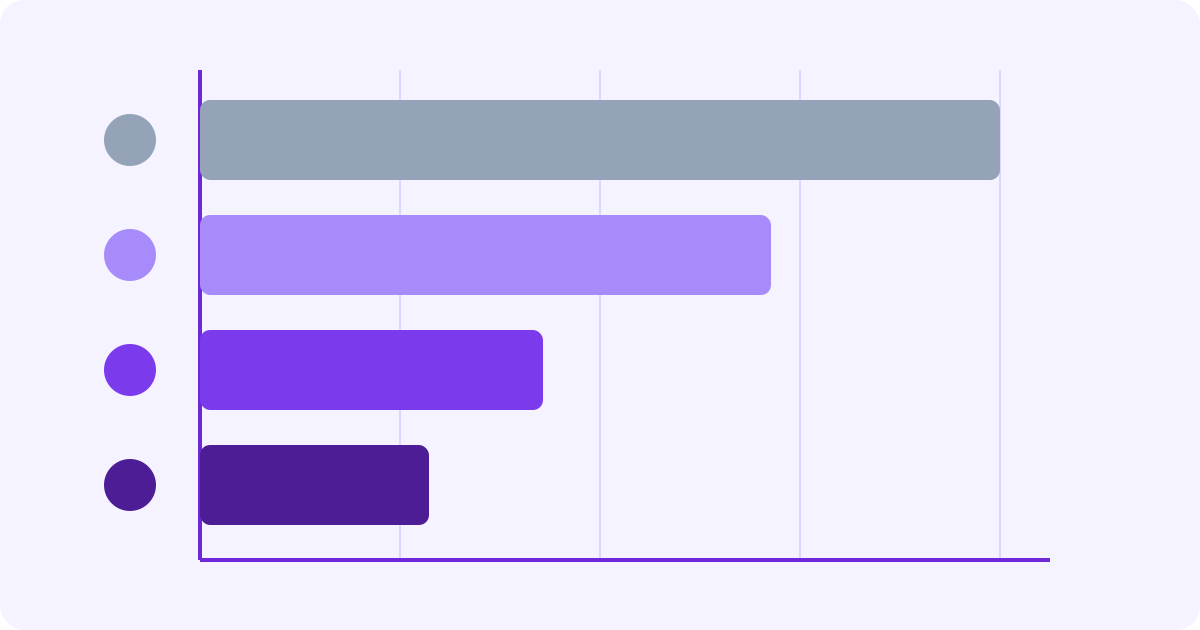
| Stage | Eligibility rejections (%) | Bar chart |
|---|---|---|
| Manual checks at check-in | 7 | ███████ |
| Plus digital insurance capture | 5 | █████ |
| Plus automatic check at booking | 3 | ███ |
| Plus exception alerts and re-check | 2 | ██ |
What Should Practices Measure for Verification?
Four measures show whether verification is happening early and working.
- Percentage of visits verified at least 24 hours in advance.
- Number and share of claims rejected for eligibility reasons.
- Average staff minutes spent per verification.
- Share of patient balances collected at the time of service, which you can track in your management dashboards.
Is Eligibility Automation Secure and Compliant?
Yes, when patient and insurance data is protected and each check has a clear purpose. Keep these points in mind:
- Run checks only for patients who have a booked or planned visit.
- Store insurance data in an encrypted system with role-based access.
- Keep an audit log of every inquiry and who viewed the results.
- Use payer-approved electronic connections and follow HIPAA rules for your organization.
- Explain estimates to patients clearly, and note that final amounts depend on the payer.
Methodology and Limitations
The numbers in this article come from an illustrative model created by Nova Reach Digital to show how each step may affect eligibility rejections. They are not drawn from a published study or a specific organization. Real results depend on payer mix, specialty, scheduling lead time and data quality. Record your own rejection rate for at least three months before judging the effect of any change.
Related Reading
- Insurance and pre-authorization automation
- Billing and claims automation
- Denial management automation
- Provider credentialing automation
- Prescription refill automation
- Referral management automation
Conclusion
Eligibility verification automation does not guarantee payment, but it makes sure that coverage problems are found while there is still time to fix them. Patients hear about their costs earlier, and billing teams spend less time reworking rejected claims. If you need an eligibility workflow for your practice or hospital, contact Nova Reach Digital or read more about our healthcare automation services.
Get Directions
Frequently Asked Questions
Keep reading
What Are the Top Email Marketing Automation Tools for Small Businesses? Reading the Tool Comparison, the Five Steps and the Sample Email Bookings
A question-and-answer guide to choosing among the top email marketing automation tools for small businesses: what they do, why programs underperform, 5 steps, a weak vs stronger table, a sample bookings chart, rules and FAQs.
What Are the Top Social Media Automation Tools for Small Businesses? Reading the Tool Comparison, the Five Steps and the Sample Posting Time
A question-and-answer guide to choosing among the top social media automation tools for small businesses: what to automate, why accounts feel robotic, 5 steps, a weak vs stronger table, a sample time-savings chart, rules and FAQs.
How Do You Choose Among the Top Digital Marketing Agencies in NYC? Reading the Agency Types, the Five Steps and the Sample Cost Per Customer
A question-and-answer guide to choosing among the top digital marketing agencies in NYC: what agencies do, why businesses switch, 5 steps to choose, an agency-types table, a sample cost-per-customer chart, rules and FAQs.
Put These Ideas to Work with NovaReach
Automate your marketing, launch AI voice agents, and keep every lead moving, all from one dashboard.