How Does OPD Queue Automation Cut Patient Waiting Time? Reading the Token Flow, the Five Steps and the Sample Wait-Time Numbers
A question-and-answer guide to OPD queue and token management automation: why patients wait, 5 automation steps, a manual vs automated table, a sample waiting-time graph, key metrics and FAQs.
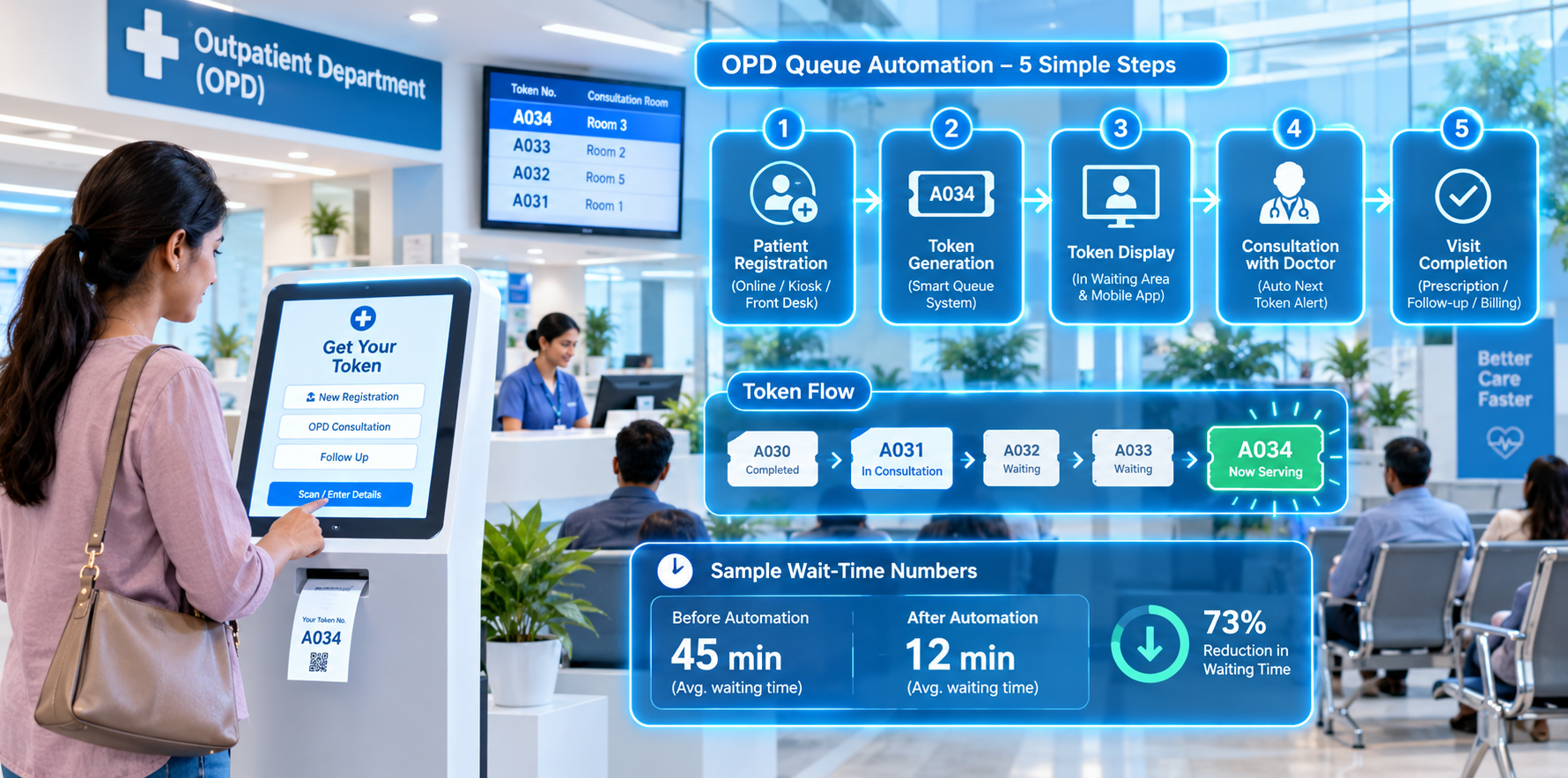
OPD queue and token management automation is a system that registers patients before they arrive, issues digital tokens, updates waiting times in real time and balances the load across doctors. In a typical hospital outpatient department, long waiting time comes less from the number of patients and more from manual registration, uneven doctor loads and no information for people sitting in the hall. This guide explains how the automation works, what a sample result looks like and how to start, in plain language and in a question-and-answer format.
Key Findings
- 5 steps cover the full OPD journey: pre-registration, digital token, live queue display, doctor load balancing and waiting-time alerts.
- In the illustrative model below, average waiting time falls from 45 minutes to 14 minutes (about a 69% drop) when all five steps are active.
- Registration is usually the first bottleneck, and online pre-registration alone moves the sample wait from 45 to 32 minutes.
- 4 numbers are enough to track success: average wait, longest wait, doctor idle time and patients who leave without being seen.
- All figures in this article are illustrative examples, not guaranteed results. Real numbers depend on your hospital size, specialties and patient mix.
What Is OPD Queue and Token Management Automation?
It is software that replaces paper slips and shouting out names with a digital token and a live queue. The patient gets a token number on WhatsApp, SMS or at a kiosk. A screen in the hall, and the patient's phone, show which token is being served and the expected time. Doctors see their own list with patient details ready. Staff can see all queues on one dashboard.
Why Do Patients Wait So Long in the OPD?
The most common reasons are manual registration, uneven doctor schedules and no visibility. Hospitals usually find a mix of the following:
- Registration counters handle every new patient by hand, and every form is retyped.
- Walk-ins and booked patients are mixed in one line without a clear rule.
- One doctor has a long line while another has a short one, and nobody redirects patients.
- Patients do not know how long they will wait, so they keep asking the staff, which slows everything further.
- Reports and past records are not ready when the patient reaches the doctor.
How Can Hospitals Automate OPD Queues? 5 Steps
1. Pre-Register Patients Before They Arrive
Online or WhatsApp pre-registration removes the longest manual step. Patients enter their details and symptoms from home, and returning patients are identified by phone number. At the hospital they only confirm their identity instead of filling a form.
2. Issue a Digital Token on Arrival
A digital token gives every patient a fair, visible place in the queue. The token can be generated through a QR code, a kiosk or the front desk. Booked patients and walk-ins can follow different rules, and emergency or senior-citizen priority can be set in the system.
3. Show the Live Queue on Screens and Phones
Live updates reduce crowding and repeated questions. A hall display shows the current token, and the patient receives a message when they are about to be called. Patients can wait in the cafeteria or the car instead of standing at the door.
4. Balance the Load Across Doctors
The system shows which doctors are overloaded and which have free time. Front-desk staff can offer another doctor in the same specialty when the wait is long, and the doctor's screen shows the patient's history and earlier reports before the consultation begins.
5. Send Waiting-Time Alerts and Handle Delays
Honest information about delays keeps patients calm. If a doctor is running late, the system updates expected times and sends a short message to affected patients. Managers get an alert when any queue crosses a set limit.
| Step | Manual way | Automated way |
|---|---|---|
| Registration | Paper form and retyping | Online pre-registration with phone-number match |
| Queue order | Slips and verbal calling | Digital token with priority rules |
| Waiting information | Patients ask the staff | Live display and mobile updates |
| Doctor load | Unknown until the hall is full | Dashboard with queue length per doctor |
| Delays | No communication | Automatic alerts to patients and managers |
How Much Waiting Time Can Automation Save? A Sample Graph
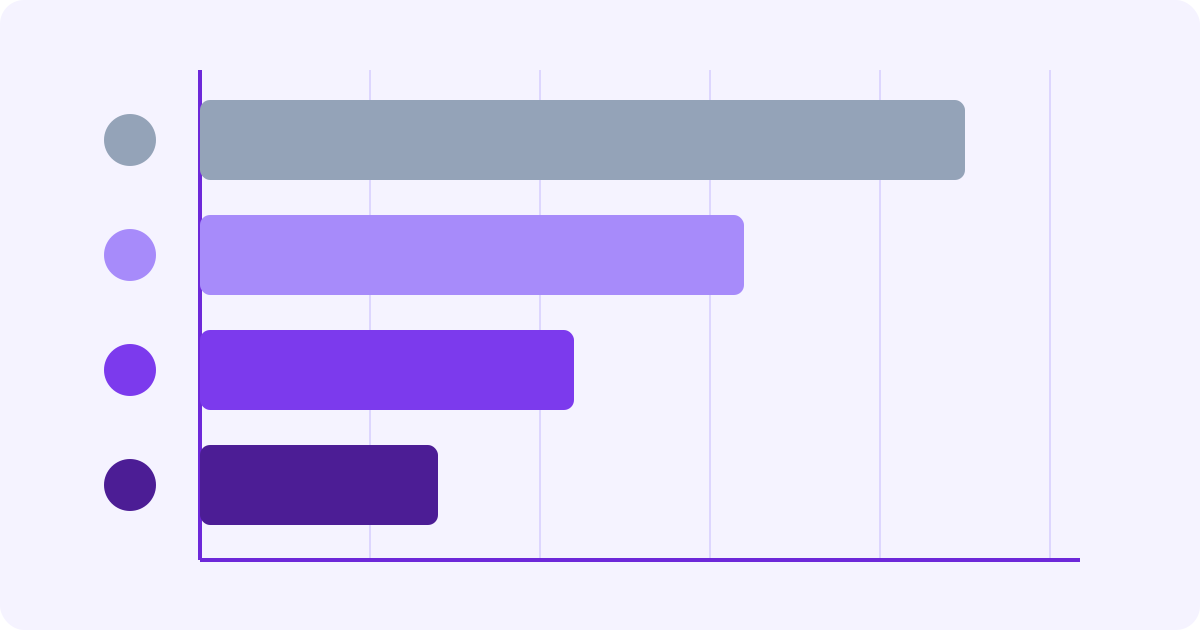
In this illustrative example for a busy multi-specialty OPD, the average wait drops from 45 to 14 minutes. The bars run from top to bottom in the same order as the table below, and each block (█) equals 3 minutes of average waiting time.
| Stage | Average wait (minutes) | Bar chart |
|---|---|---|
| Manual queue | 45 | ███████████████ |
| Plus online pre-registration | 32 | ███████████ |
| Plus digital token and live display | 22 | ███████ |
| Plus load balancing and alerts | 14 | █████ |
What Should Hospitals Measure After Automating the OPD?
Four measures give a clear picture without extra paperwork.
- Average and longest waiting time, by department and by hour of the day.
- Doctor idle time and the number of patients seen per doctor per session.
- Percentage of patients who leave before seeing the doctor.
- Patient satisfaction score for waiting time and clarity of information.
Is OPD Queue Automation Safe and Compliant?
Yes, when patient data is handled carefully. A few rules keep the system safe:
- Display only token numbers on public screens, never names or diagnoses.
- Limit access to patient details to staff who need them and keep an audit trail.
- Take patient consent before sending messages on WhatsApp or SMS.
- Keep a manual backup, such as printed tokens, for power or network failures.
- Follow local data protection and healthcare regulations.
Methodology and Limitations
The numbers in this article come from an illustrative model created by Nova Reach Digital to show how each step may affect waiting time. They are not drawn from a published study or a specific hospital. Actual results depend on patient volume, number of doctors, layout, staff training and how consistently the process is followed. A hospital should measure its own baseline for two to four weeks before and after any change.
Conclusion
Automating OPD queues does not make doctors see patients faster. It removes the waiting that comes from paperwork, confusion and uneven distribution, so patients are seen on a fair and visible schedule. If you need an OPD token and queue system that fits your hospital, contact Nova Reach Digital or read more about our healthcare automation services.
Get Directions
Frequently Asked Questions
Keep reading
What Are the Top Email Marketing Automation Tools for Small Businesses? Reading the Tool Comparison, the Five Steps and the Sample Email Bookings
A question-and-answer guide to choosing among the top email marketing automation tools for small businesses: what they do, why programs underperform, 5 steps, a weak vs stronger table, a sample bookings chart, rules and FAQs.
What Are the Top Social Media Automation Tools for Small Businesses? Reading the Tool Comparison, the Five Steps and the Sample Posting Time
A question-and-answer guide to choosing among the top social media automation tools for small businesses: what to automate, why accounts feel robotic, 5 steps, a weak vs stronger table, a sample time-savings chart, rules and FAQs.
How Do You Choose Among the Top Digital Marketing Agencies in NYC? Reading the Agency Types, the Five Steps and the Sample Cost Per Customer
A question-and-answer guide to choosing among the top digital marketing agencies in NYC: what agencies do, why businesses switch, 5 steps to choose, an agency-types table, a sample cost-per-customer chart, rules and FAQs.
Put These Ideas to Work with NovaReach
Automate your marketing, launch AI voice agents, and keep every lead moving, all from one dashboard.