Automated Social Media Posting: A Practical Playbook for New York Small Businesses
Posting every day by hand is not sustainable for most New York business owners. Here is how to plan, schedule and auto-publish social content that still sounds like you.
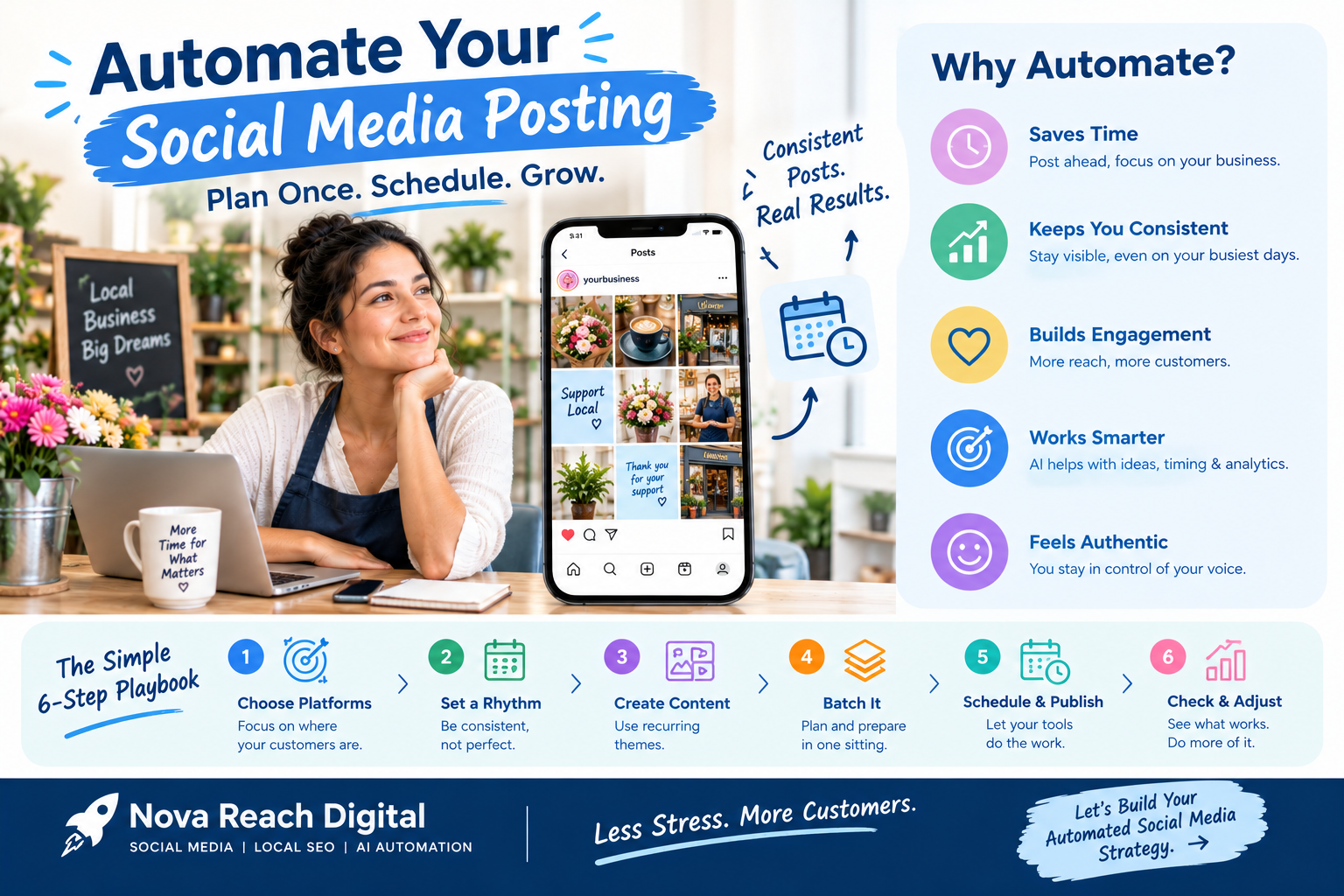
Picture a typical week for a New York business owner. Monday is inventory, Tuesday is a staffing problem, Wednesday is a big client, and somewhere in between there is a voice saying, "We really should post something today." By Friday, the Instagram account has not been touched, and the last Facebook update is three weeks old.
This is not a discipline problem. It is a systems problem. Posting by hand, one update at a time, depends on finding spare minutes that rarely exist in a busy week. Automated social media posting replaces that daily scramble with a simple routine: plan once, schedule ahead, and let your tools publish for you. This playbook walks through how to do it in a way that saves time without making your brand feel automated.
The Real Cost of Posting Manually
Manual posting looks free, but it carries hidden costs that add up quickly:
- Lost focus. Stopping work to write a caption, find a photo and log in to several apps breaks your attention several times a day.
- Uneven presence. Busy weeks mean silence, and quiet accounts lose visibility in social feeds.
- Rushed content. Posts written in a hurry tend to be weaker, less on-brand and easier to scroll past.
- No time to learn. When every post is a last-minute effort, nobody steps back to ask which posts actually brought in customers.
How Automated Posting Works
At its core, automated posting has three parts:
- A plan that decides what you will talk about and when.
- A content library of captions, images and videos prepared in advance.
- A scheduling platform connected to your social accounts that publishes each post at its set time.
AI tools now add a helpful fourth layer. They can turn one idea into several platform-specific versions, suggest hashtags, recommend publishing times and summarize performance. Think of AI as a fast assistant for first drafts, not as the final voice of your brand.
The Playbook: Six Moves to Automate Your Social Media
Move 1: Pick your priority channels
You do not need to be everywhere. A Queens bakery may get the most from Instagram and Google Business Profile, while a Manhattan accounting firm may find LinkedIn far more valuable. Choose the two or three platforms where your customers already spend time and do them well.
Move 2: Set a realistic posting rhythm
Decide how often you will post on each channel, and make sure you can keep it up for months, not just weeks. A steady three posts a week usually beats a burst of daily posts followed by silence.
Move 3: Create recurring content themes
Recurring themes make planning almost automatic. Examples include:
- Tip Tuesday: one useful piece of advice related to your industry
- Customer spotlight: a review, testimonial or project story
- Behind the counter: your team, your process or your space
- Neighborhood moments: local events, seasons and community news
- Offer of the week: a promotion, new product or booking reminder
Move 4: Batch your content in one sitting
Block two or three hours, once or twice a month, to write captions, take or select photos and edit short videos. Working in batches is faster and produces more consistent content than creating posts one at a time.
Move 5: Load the queue and let it run
Add your content to a scheduling platform, adjust each post for the platform it is going to, and set publishing times in Eastern Time. Look for a tool with a visual calendar, multi-account support, team approvals and built-in analytics.
Move 6: Check in, respond and adjust
Automation handles publishing, but people still handle relationships. Spend ten to fifteen minutes a day replying to comments and messages. Once a month, review which posts earned clicks, calls and bookings, then shape next month's calendar around those winners.
Where Automation Should Stop
The fastest way to damage trust on social media is to let automation speak for you in moments that need a person. Keep these tasks human:
- Responding to complaints, negative reviews and sensitive questions
- Reacting to breaking news, weather disruptions or citywide events
- Sharing personal stories and live moments from your business
- Deciding whether a scheduled post still makes sense if circumstances change
A useful habit: whenever something major happens in the news or in your business, check your queue and pause anything that might now feel off.
Signs Your Automated Posting Is Working
- Your accounts stay active even during your busiest weeks.
- You spend less time posting and more time talking with customers.
- Your feed looks planned and consistent instead of random.
- You can point to specific posts that led to inquiries, bookings or sales.
- Each month's content plan is shaped by real data rather than guesswork.
Connect Social Posting to the Rest of Your Marketing
Automated posting delivers the most value when it feeds a larger system. A scheduled post can send people to a landing page, where an automated form captures their details, an email sequence follows up, and a reminder brings them back to book. When social media, your website, email and CRM work together, every post becomes a starting point for a real customer relationship.
Start Small, Then Scale
Begin with one channel and one month of scheduled posts. Once the routine feels easy, add a second platform, build a library of evergreen content to recycle, and connect your posts to automated lead follow-up.
Nova Reach Digital helps New York small businesses design automated social media systems that stay consistent, sound authentic and support real growth. If you are ready to stop scrambling for posts every day, talk to our team about building your automated content workflow.
Frequently Asked Questions
Keep reading
AI Receptionist for New York Small Businesses: How AI Call Answering and Missed-Call Automation Capture Every Lead
Quick answer on AI receptionists: how AI call answering, missed-call automation and AI appointment booking help New York small businesses capture every lead, plus setup steps and compliance tips.
Google Business Profile Optimization for New York Businesses: 9 Steps to Rank on Google Maps and in AI Answers
Quick answer and 9-step checklist for Google Business Profile optimization in New York: categories, reviews, photos, posts, plus how to get cited in Google AI, ChatGPT and other answer engines.
Social Media Automation for New York Businesses: How to Auto-Post Consistently Without Losing the Human Touch
A practical guide to automated social media posting for New York businesses: what to automate, what to keep human, how to set up a scheduling workflow, and the mistakes that make automated feeds feel robotic.
Put These Ideas to Work with NovaReach
Automate your marketing, launch AI voice agents, and keep every lead moving, all from one dashboard.