Healthcare Internal Linking Strategy for Large Healthcare Organizations
How large healthcare organizations can manage internal linking at enterprise scale with documented architecture, template-driven links, governance, cannibalization control and ongoing monitoring for healthcare website SEO.
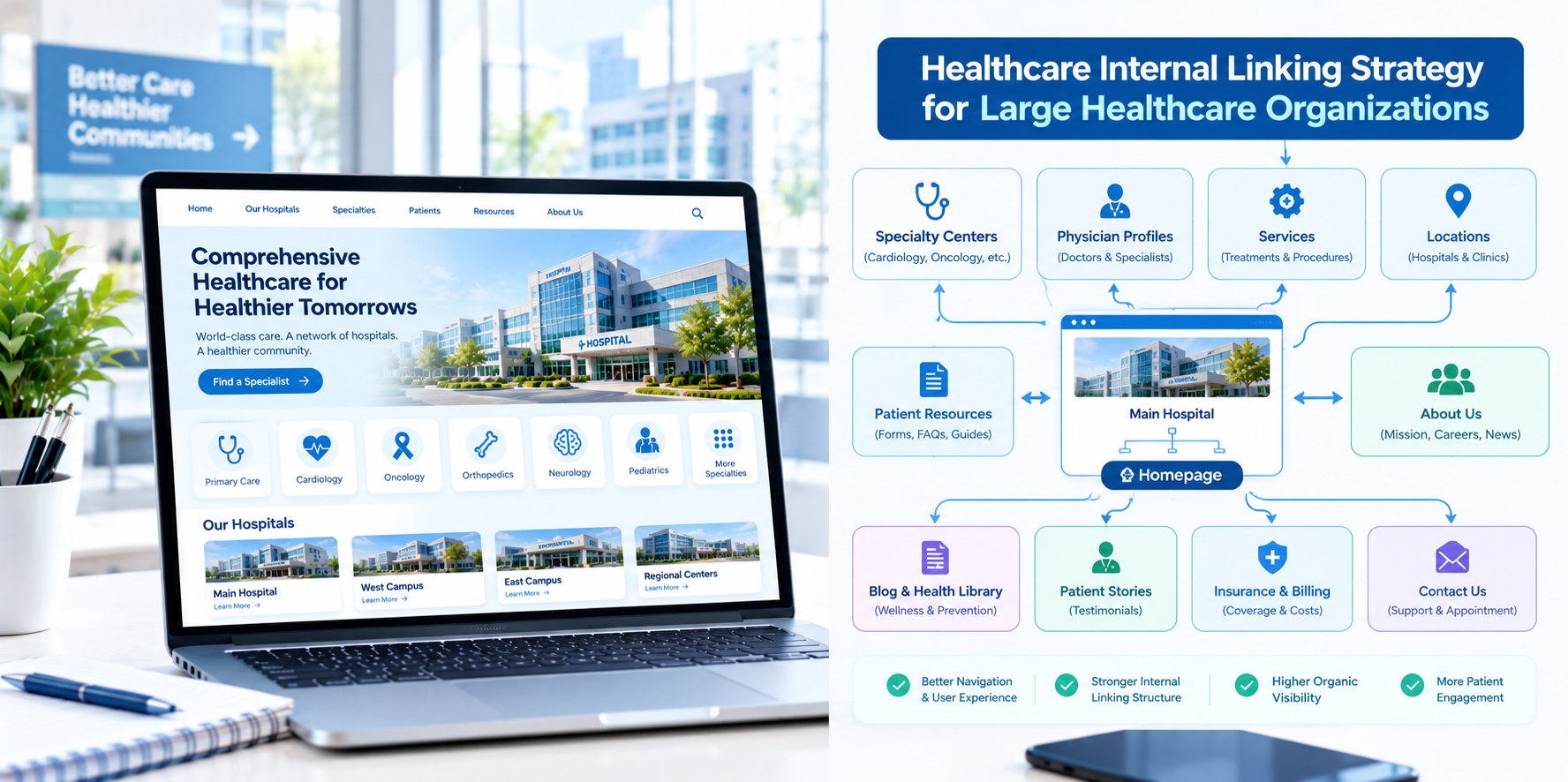
A large healthcare organization may run a website with tens of thousands of pages: service lines, conditions, physicians, locations, news, clinical trials, research, careers, patient resources and more. At that size, internal linking stops being a matter of adding a few links. It becomes an engineering and governance challenge. Links must be generated at scale, kept accurate as data changes and managed across many teams, systems and approval layers.
This guide explains how large healthcare organizations in the USA can approach internal linking systematically to support healthcare website SEO, patient navigation and operational efficiency.
What Changes at Enterprise Scale
- Volume: Manual linking cannot keep up with thousands of pages and constant updates.
- Data-driven pages: Physician, location and service pages are often generated from databases, so linking rules must be built into templates.
- Multiple teams: Marketing, IT, clinical content, compliance, research and recruitment all publish or approve content.
- Crawl efficiency: Search engines may not crawl every page frequently, so structure and link depth matter more.
- Risk: Errors at scale, such as a broken template link, can affect thousands of pages at once.
Step 1: Define the Information Architecture
Start with a documented architecture that everyone can reference. A typical enterprise structure includes:
- Top-level hubs: Find care, find a doctor, locations, conditions and treatments, patients and visitors, research and education, about us, careers.
- Service line hierarchies: A hub for each major specialty with subpages for conditions, treatments, programs and related content.
- Entity directories: Structured listings for physicians, locations and programs, with consistent profile page templates.
- Content libraries: Patient education, news, stories, research and events.
Aim to keep priority patient pages within three clicks of the home page and to avoid deep, buried sections.
Step 2: Build Linking Into Templates
At scale, the best links are automated through templates and data relationships, with careful quality control:
- Physician profiles automatically link to their specialties, practicing locations and booking.
- Location pages automatically list and link to services and physicians available there.
- Service line pages automatically list and link to locations and physicians, and to related conditions and treatments.
- Condition and treatment pages link to service lines, physicians and related patient resources.
- Breadcrumbs reflect hierarchy automatically.
Work with developers to ensure templates only link to active, accurate entities and handle changes gracefully, for example when a physician retires or a location closes.
Step 3: Add Contextual Editorial Links
Template links provide structure, while editorial links provide context. Encourage content teams to add relevant links within body content, using descriptive anchor text, to help readers move to the next step. Provide training and examples, and include link checks in editorial review.
Step 4: Manage Link Equity With Intent
- Prioritize key pages: Make sure high-value service line and location pages receive links from relevant, high-traffic pages.
- Reduce link clutter: Mega menus and footers with hundreds of links can dilute clarity. Limit them to the most important destinations.
- Avoid linking to low-value pages at scale: Thin or outdated pages should be improved, merged or retired rather than linked everywhere.
- Use pagination and filters thoughtfully: Directory pages with filters can generate large numbers of near-duplicate URLs. Work with SEO and development teams to manage them appropriately.
Step 5: Prevent Cannibalization at Scale
Large organizations often have overlapping pages: an institute page, a service line page, a program page and a news article that all target the same topic.
- Assign a primary page for each major topic and location combination.
- Maintain a topic-to-URL map that content teams can consult before publishing.
- Link supporting pages to the primary page with consistent anchor text.
- Consolidate where appropriate: Merge duplicate or competing pages and redirect old URLs.
Step 6: Establish Governance
Without ownership, link quality decays. Set up:
- A central SEO or web governance team that owns architecture, linking standards and tools.
- Service line and department content owners responsible for accuracy and review dates.
- Change management processes for launching new pages, retiring old ones, renaming programs and handling location changes.
- Documentation: A living guide to page types, templates, naming and linking rules.
- Compliance involvement: Clinical and legal review of sensitive content and tracking practices.
Step 7: Monitor at Scale
- Automated crawls on a regular schedule to detect broken links, redirect chains, orphan pages and unusual changes in link counts.
- Dashboards for key metrics by service line and location.
- Alerts for template changes that affect many pages.
- Log file and search performance analysis to understand how search engines crawl and index important sections.
Use AI and Automation Carefully
AI can help large teams find linking opportunities across thousands of pages, cluster content by topic and surface orphan or competing pages. Treat recommendations as suggestions. Human reviewers should confirm relevance, accuracy and clinical appropriateness before changes are applied, and sensitive information should never be entered into unapproved tools.
Privacy and Compliance at Scale
- Review tracking and analytics tools across templates, especially on appointment, portal and condition-specific pages, with privacy and legal teams.
- Do not include patient information in URLs, parameters or link labels.
- Maintain clear review dates for clinical content that is linked widely.
- Ensure accessibility of navigation and links across templates.
This is general information, not legal advice.
Metrics for Large Organizations
- Organic visibility and clicks by service line, location and physician.
- Crawl and indexing health of priority sections.
- Number of orphan pages, broken links and redirect chains.
- Click-through from educational pages to service, physician and booking pages.
- Appointment requests and calls by source page.
- Time to publish and update content, showing process efficiency.
Common Mistakes
- Relying on manual linking only. It cannot scale.
- Hidden template changes. One change can break thousands of links.
- Giant menus and footers. Clarity suffers.
- No retirement process. Old pages and links linger.
- Siloed teams. Marketing, IT and clinical teams should share a single view of structure.
Final Thoughts
At enterprise scale, internal linking is a system, not a task. Document your architecture, build links into templates, support them with editorial context, govern changes and monitor continuously. If your organization would like help planning an enterprise internal linking and site architecture program, Nova Reach Digital can help you design and implement it.
Frequently Asked Questions
Keep reading
Healthcare Internal Linking Strategy for Multi-Location Hospitals
How multi-location hospitals can build an internal linking strategy that connects locations, service lines and physicians, avoids page cannibalization and improves healthcare website SEO.
Healthcare Internal Linking Strategy for Private Hospitals
How private hospitals can use internal linking to build service line hubs, connect physicians and practical information, and guide patients from research to appointment while improving healthcare website SEO.
Healthcare Internal Linking Strategy for Specialty Clinics
How specialty clinics can use internal linking to connect conditions, treatments and providers, build topical depth and guide patients from research to consultation while improving healthcare website SEO.
Put These Ideas to Work with NovaReach
Automate your marketing, launch AI voice agents, and keep every lead moving, all from one dashboard.