Healthcare Internal Linking Strategy for Multi-Location Hospitals
How multi-location hospitals can build an internal linking strategy that connects locations, service lines and physicians, avoids page cannibalization and improves healthcare website SEO.
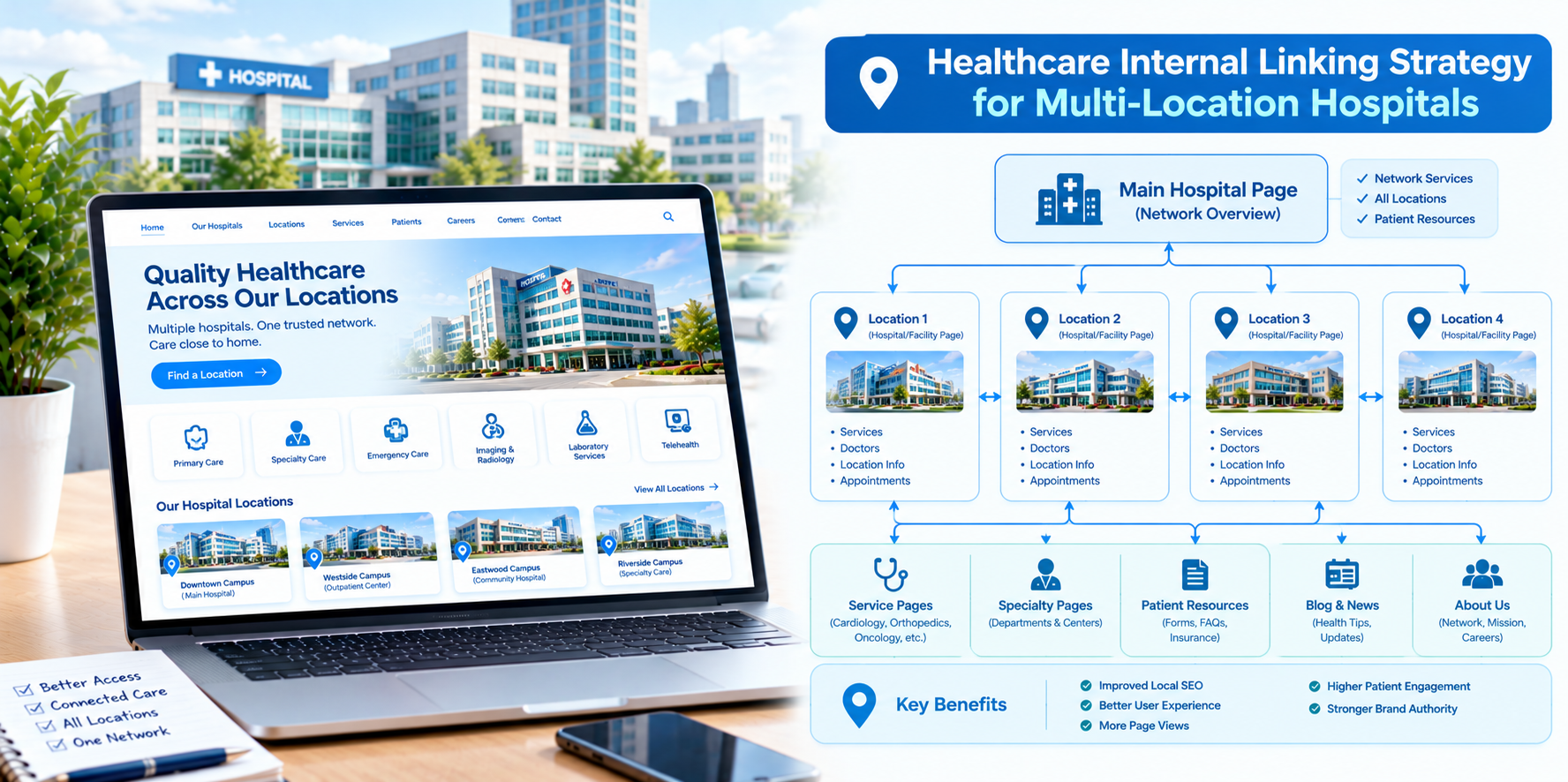
A hospital system with many locations has a website problem that single-site providers never face: dozens or hundreds of pages that look similar, compete for the same searches and confuse both patients and search engines about which page to show. Internal links are the cheapest, most controllable tool you have for fixing this. They tell search engines which pages matter, how locations relate to services and where patients should go next.
This guide explains how multi-location hospitals in the USA can build an internal linking strategy that supports healthcare website SEO, strengthens each location's visibility and keeps the patient journey simple.
Why Multi-Location Hospitals Need a Deliberate Linking Plan
- Page duplication risk: Many locations offer the same services, which can produce near-identical pages that compete with one another.
- Orphaned location pages: New clinics and campuses often launch without links pointing to them.
- Authority concentrated on the homepage: Without links, deeper location and service pages receive little internal support.
- Patient confusion: A visitor looking for orthopedics near their home should reach the right location in a click or two.
Build a Clear Site Structure First
Links work best on top of a logical structure. A common pattern for multi-location systems has four levels:
- System homepage: The overview of the organization.
- Hub pages: One for locations, one for services and one for physicians.
- Location pages and service line pages: Individual campuses and clinics, and individual specialties.
- Detail pages: Conditions, treatments, physician profiles, location-plus-service pages and patient guides.
Aim for important pages to be reachable within three clicks from the homepage.
The Location-by-Service Matrix
The heart of a multi-location linking strategy is connecting each location to the services it actually provides, and each service to the locations where it is offered.
- From a location page: Link to every service line available at that site, using descriptive anchor text such as "cardiology at our Riverside campus."
- From a service line page: Link to every location offering that service, with a clear list or map.
- Location-plus-service pages: Where volume justifies it, create pages for a specific service at a specific location with unique details such as providers, equipment, hours and directions. Link them to both the parent location and the parent service page.
Only link to services a location truly offers. Inaccurate links frustrate patients and weaken trust.
Connect Physicians, Locations and Services
Patients often search for a doctor by name or specialty. Link each physician profile to the locations where they see patients and to the service lines they practice in, and link back from those pages to the physician. This triangle of physician, location and service helps both patients and search engines understand your organization.
Use Content to Support Location Pages
Educational articles and condition guides can pass helpful context to your commercial pages:
- Link condition and treatment guides to the relevant service line page.
- Where useful, add a short "find care near you" block that links to the locations offering that service.
- Link local community content, events and news back to the relevant location page.
Write anchor text that describes the destination clearly. Avoid generic phrases like "click here." Descriptive anchors also help patients who use screen readers.
Handling Similar Pages Without Cannibalization
- Give each location page unique value: local directions, parking, providers, hours, community details and services.
- Do not clone service pages across locations with only the city name changed. Use one strong service line page and location-specific pages that add real local information.
- Be consistent with anchor text: Use location names in anchors for location pages and service names for service pages so each page has a clear identity.
- Check canonical tags with your web team to make sure duplicate or parameter-based URLs do not dilute signals.
Navigation, Breadcrumbs and Footers
- Main navigation: Keep top-level items focused: find a doctor, find a location, services and book an appointment.
- Breadcrumbs: Show the path, such as Home, Locations, Riverside Campus, Cardiology, to help patients and reinforce structure.
- Footer links: Use them sparingly for key hubs and policies, not for hundreds of location links.
- Store locator and maps: Make sure each result links to the individual location page, and that Google Business Profiles link back to the same pages.
A Step-by-Step Audit and Rollout
- Crawl the site with an SEO crawling tool to list pages, links and depth.
- Find orphan pages that have no internal links, especially new or recently moved locations.
- Map each location to its services and verify accuracy with operations teams.
- Identify competing pages that target the same search with similar content.
- Fix broken and redirected links, especially after location closures or moves.
- Add hub links from locations to services and services to locations.
- Improve anchor text to be descriptive and accessible.
- Re-crawl and monitor impressions, clicks and appointment requests by location.
Privacy, Accuracy and Compliance Notes
- Keep clinical content on linked pages reviewed by qualified clinicians.
- Do not put patient information in URLs or link parameters.
- Review tracking tools on appointment and portal pages with your compliance team.
- Update links promptly when services, providers or locations change.
This is general information, not legal advice.
Common Mistakes
- Linking everything to everything. Too many links dilute meaning.
- Relying only on a location dropdown. Menus alone do not give pages context.
- Launching new locations without links.
- Using the same anchor text for different pages.
- Ignoring closed or relocated sites. Redirect and update links.
Final Thoughts
For multi-location hospitals, internal linking is how a large website becomes understandable. Connect each location to its real services, link physicians into the same network and keep every page unique and accurate. If you would like help auditing your hospital website's internal links, Nova Reach Digital can help you plan and implement a structure that works for patients and search engines.
Frequently Asked Questions
Keep reading
Healthcare Internal Linking Strategy for Private Hospitals
How private hospitals can use internal linking to build service line hubs, connect physicians and practical information, and guide patients from research to appointment while improving healthcare website SEO.
Healthcare Internal Linking Strategy for Specialty Clinics
How specialty clinics can use internal linking to connect conditions, treatments and providers, build topical depth and guide patients from research to consultation while improving healthcare website SEO.
Healthcare Internal Linking Strategy for Medical Practices
A practical guide for independent medical practices on internal linking: map your pages, connect services, providers and booking, link blog posts to service pages and improve healthcare website SEO without a big budget.
Put These Ideas to Work with NovaReach
Automate your marketing, launch AI voice agents, and keep every lead moving, all from one dashboard.