Healthcare Internal Linking Strategy for Medical Practices
A practical guide for independent medical practices on internal linking: map your pages, connect services, providers and booking, link blog posts to service pages and improve healthcare website SEO without a big budget.
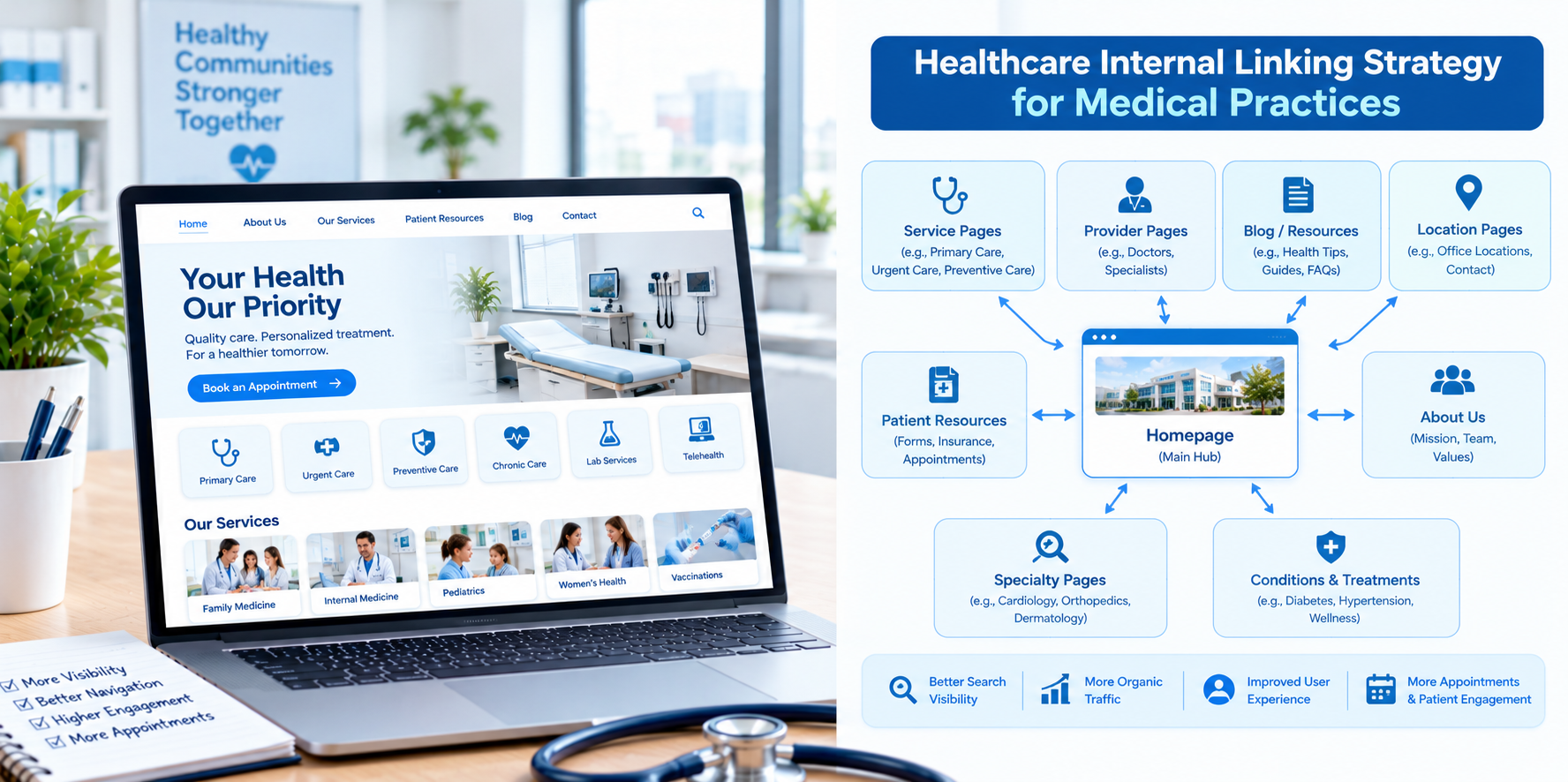
Most medical practices do not have a big marketing department. They have a website that someone built a few years ago, a handful of service pages, a physician bio or two and a contact form. The good news is that a small site can be easy to organize. A simple, thoughtful internal linking structure can help new patients find the right page, help existing patients find what they need and give search engines a clear picture of what your practice does and where.
This guide explains how independent medical practices in the USA, from family medicine and pediatrics to dental, therapy and group practices, can use internal linking to improve healthcare website SEO without a large budget or a technical team.
Why Internal Links Matter for a Smaller Practice
- Help patients find answers fast: New and existing patients want hours, services, insurance information and a way to book.
- Show search engines what matters: Pages with more helpful internal links tend to be understood as more important.
- Make every page work harder: A blog post that links to a service page can send interested readers toward booking.
- Cost almost nothing: Internal linking is mostly a matter of planning and consistent editing.
Step 1: Map the Pages You Already Have
Start with a simple list of every page on your site. Most practices will see groups like these:
- Home page
- About the practice and team
- Service or treatment pages
- Physician or provider profiles
- New patient information
- Insurance and billing
- Location and contact page
- Blog or health resources
- Forms and patient portal links
Note which pages have no links pointing to them. Those are orphan pages and are easy to miss.
Step 2: Create a Simple Structure
For a small practice, a clean structure is usually enough:
- Home page links to your main service pages, your providers, your location and your booking option.
- Service pages each cover one service in depth and link to the providers who offer it and to booking.
- Provider pages link to the services each provider offers and to booking.
- Location page links to services, providers and directions.
- Blog posts link to the most relevant service page and to booking.
Keep important pages within two or three clicks of the home page.
Step 3: Make Your Navigation Do the Heavy Lifting
- Keep the main menu short: Services, Our Team, New Patients, Insurance, Contact and a visible Book Appointment button are usually enough.
- Use clear labels: "Family Medicine" is better than "What We Do."
- Add a click-to-call button on mobile.
- Use a simple footer with address, phone, hours and a few key links.
Step 4: Link Blog Posts to Service Pages
If your practice publishes health education content, each article should help move readers toward care when appropriate. For example:
- An article on back-to-school checkups can link to your pediatric well-child visit page.
- An article on managing seasonal allergies can link to your allergy or primary care page.
- An article on preparing for a first therapy session can link to your counseling services page and intake information.
Place the link where it naturally fits, often near the end of a section or in a short "Learn more about our services" note, and avoid pushing every paragraph toward a sales message.
Step 5: Connect Providers and Services
Patients often choose a practice because of a particular clinician. On each provider page, link to the services that provider offers. On each service page, link to the providers who deliver that service. Keep bios current, with credentials, languages spoken, special interests and whether they are accepting new patients.
Step 6: Add Helpful Practical Pages and Link to Them
Small practices often get calls that a website could answer. Create short, clear pages for:
- New patient information: What to bring, how to register and what to expect.
- Insurance and payment: Accepted plans, how to verify coverage and payment options.
- Frequently asked questions: Hours, cancellations, prescriptions refills process and after-hours instructions.
- Telehealth: If you offer virtual visits, explain how they work.
Link to these pages from service pages, provider pages and the main navigation.
Step 7: Support Local Search
- Link your Google Business Profile to the most relevant page, usually the home page or the location page.
- Make sure your name, address and phone number are consistent across your site and listings.
- Link the location page to the services you offer there and include directions, parking and accessibility details.
Anchor Text for Smaller Sites
- Be clear and specific: "pediatric well-child visits" is better than "read more."
- Keep it natural: Do not repeat the same phrase unnaturally in every link.
- Make links easy to see and tap on mobile.
- Remember accessibility: Links should make sense to people using screen readers.
A One-Afternoon Audit
- List all pages and mark which ones lead to booking.
- Check each service page: Does it link to providers, related services and booking?
- Check each provider page: Does it link to services and booking?
- Check each blog post: Does it link to at least one relevant service page?
- Fix broken links. Click through your menu and key pages to catch dead ends.
- Test on a phone. Make sure the booking path is easy to find and use.
Compliance and Privacy Basics
- Have clinicians review medical content and update it regularly.
- Avoid collecting detailed health information through basic contact forms unless the form and system are designed and approved for that use.
- Review any tracking or analytics tools on appointment and portal pages with your compliance advisor.
- Do not publish patient information or stories without proper written authorization.
This is general information, not legal advice.
How to Tell If It Is Working
- More visits to service pages from blog posts and search.
- More clicks on booking and call buttons.
- Fewer repetitive phone calls asking basic questions.
- Better rankings and impressions for your key local searches over time.
Common Mistakes
- Dead-end pages. Every page should offer a next step.
- Outdated links. Check after staff changes or service changes.
- One giant "Services" page. Individual service pages give patients and search engines more clarity.
- Too many links. Keep the experience simple.
Final Thoughts
A medical practice does not need a complicated website to benefit from internal linking. Map your pages, connect services, providers, practical information and booking, and keep everything accurate. If you would like help improving your practice's website structure and local SEO, Nova Reach Digital can help you plan and implement it.
Frequently Asked Questions
Keep reading
Healthcare Internal Linking Strategy for Multi-Location Hospitals
How multi-location hospitals can build an internal linking strategy that connects locations, service lines and physicians, avoids page cannibalization and improves healthcare website SEO.
Healthcare Internal Linking Strategy for Private Hospitals
How private hospitals can use internal linking to build service line hubs, connect physicians and practical information, and guide patients from research to appointment while improving healthcare website SEO.
Healthcare Internal Linking Strategy for Specialty Clinics
How specialty clinics can use internal linking to connect conditions, treatments and providers, build topical depth and guide patients from research to consultation while improving healthcare website SEO.
Put These Ideas to Work with NovaReach
Automate your marketing, launch AI voice agents, and keep every lead moving, all from one dashboard.