Healthcare Internal Linking Strategy for Local Healthcare Providers
A local-first internal linking guide for community clinics and independent providers: anchor your location page, connect services and providers, align your Google Business Profile and make booking easy for nearby patients.
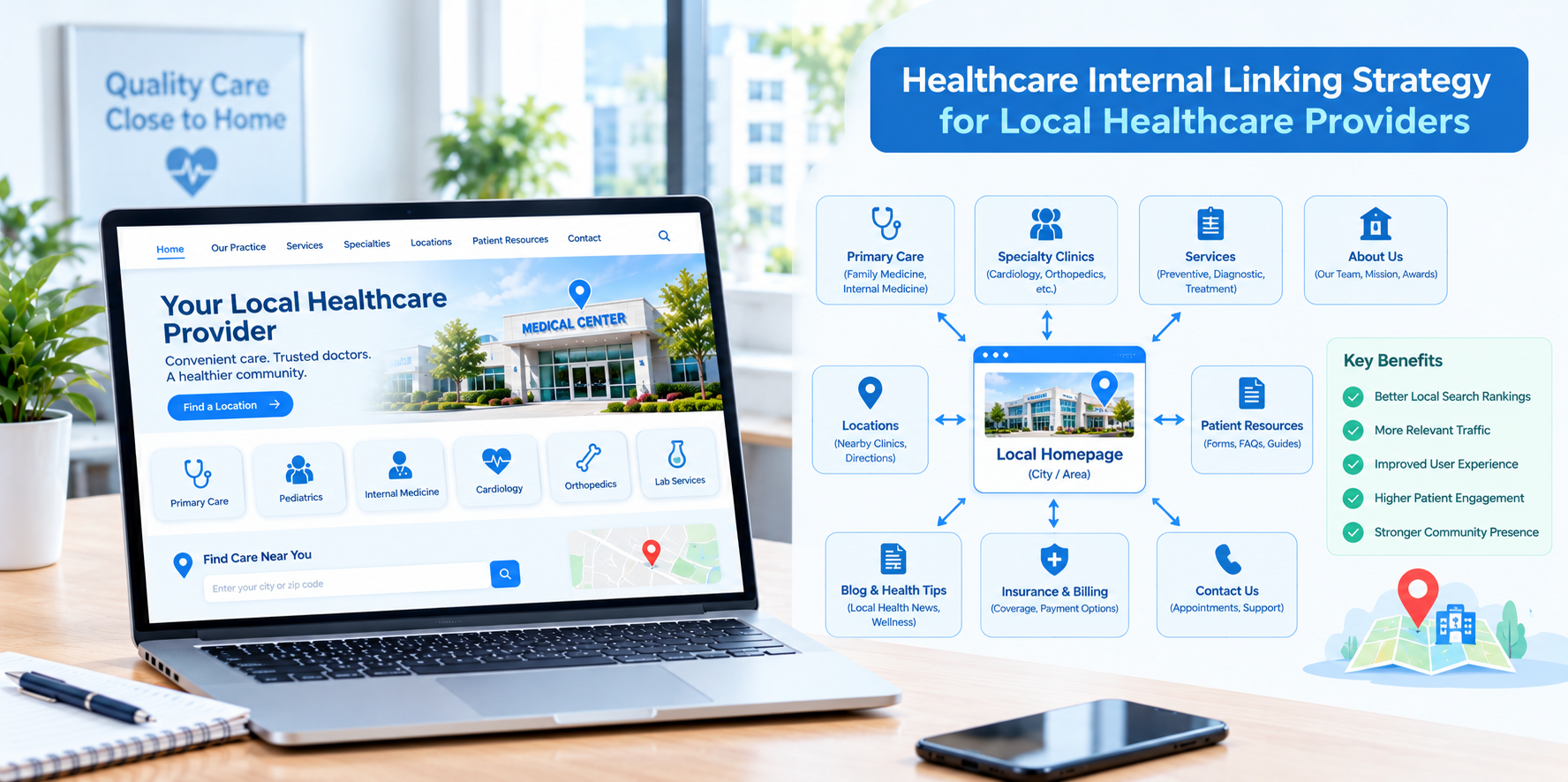
When a patient searches for "urgent care near me," "pediatrician in my town" or "physical therapy open Saturday," they are looking for a nearby provider they can trust. For local healthcare providers, such as independent clinics, community practices, urgent care centers and neighborhood specialists, winning that search depends on two things working together: a strong local presence on Google and a website that clearly connects the dots for patients and search engines. Internal linking is the glue.
This guide explains how local healthcare providers in the USA can use internal links to support local SEO, strengthen healthcare website SEO and make it simple for nearby patients to go from search to appointment.
Why Local Providers Need a Local-First Link Strategy
- Patients search by place: Neighborhood, city and "near me" searches dominate local healthcare queries.
- Proximity and relevance both matter: Your site must make it clear what you offer and where.
- Competition is close by: Other clinics in your area are targeting the same searches.
- Time is limited: Local providers often have small teams and cannot spend hours on complicated SEO projects.
Step 1: Make the Location Page Your Local Anchor
Your location page, or home page if you have a single office, should be the clearest local signal on your site. Include your full address, phone number, hours, directions, parking, public transit notes, accessibility information and a map. Then link outward to:
- Each service you offer at that location.
- Each provider who sees patients there.
- Booking and new patient information.
- Insurance and payment details.
Link to this page from your home page, your main menu, your footer and your Google Business Profile.
Step 2: Tie Your Google Business Profile to the Right Pages
- Use your location page or home page as the website link on your profile.
- Use a dedicated appointment link that goes directly to scheduling.
- List services on the profile that match the service pages on your site, and link to those pages where the platform allows it.
- Keep your name, address and phone number identical across your website and listings.
Step 3: Create Service Pages With a Local Angle
Each major service should have its own page. Describe the service in plain language, explain who it helps, outline what a visit looks like and mention the area you serve in a natural way, such as the neighborhoods or towns your patients come from. Link each service page to:
- The location page so visitors can see where to go.
- The providers who deliver the service.
- Related services, such as linking a physical therapy page to a sports injury page.
- Booking.
Avoid creating a separate near-duplicate page for every nearby town with only the name changed. Only create area pages when you can add genuine local value.
Step 4: Use Neighborhood and Community Content
Local providers have a natural advantage: they know their community. Helpful content ideas include seasonal health topics relevant to your region, guides to what to do for common concerns, community event involvement and local resource lists. Link these posts to the relevant service page and location page, and link back from service pages to the most helpful local resources.
Step 5: Link Providers to Services and Reviews
Patients often choose a local provider because of a particular clinician. Each provider page should link to the services offered, the location where the provider sees patients and the booking option. Where you have permission and a compliant process, link to a reviews or patient feedback page that is kept accurate and moderated according to platform rules.
Step 6: Make Practical Pages Easy to Find
- New patient page: What to bring, how to register and what to expect.
- Insurance page: Accepted plans and how to verify coverage.
- Hours and holiday schedule: Keep it accurate.
- Walk-in or same-day information: Clear explanation if offered.
- Telehealth page: If available, with simple instructions.
Link to these from service pages, provider pages, your menu and your footer.
Step 7: Keep Mobile Navigation Simple
Most local health searches happen on phones. Make sure the call button, directions link and booking button are visible near the top of key pages. Keep menus short and labels clear.
Anchor Text for Local Pages
- Be clear and natural: "pediatric care at our Maple Street office" is helpful and specific.
- Avoid stuffing: Do not add the city name to every link.
- Use descriptive text: Avoid "click here" and "read more."
- Remember accessibility: Links should make sense to screen reader users.
A 60-Minute Local Link Checkup
- Open your home page on a phone and see how many taps it takes to call, get directions or book.
- Check that your location page links to every service and provider.
- Check that each service page links to the location page and booking.
- Click your Google Business Profile links to confirm they go to the right pages.
- Look for broken links and outdated hours, providers or services.
- Confirm that blog posts link to relevant services.
Compliance and Privacy Basics
- Have a qualified clinician review medical content.
- Do not publish patient information, photos or testimonials without proper written authorization.
- Avoid collecting detailed health information on basic forms unless the system is approved for it.
- Review tracking tools on booking pages with your compliance advisor.
- Respond to reviews without confirming that a reviewer is a patient or disclosing any health information.
This is general information, not legal advice.
Measuring Local Results
- Calls, direction requests and website clicks from your Google Business Profile.
- Visits to location and service pages.
- Appointment requests by service.
- Local search rankings for your main services in nearby areas.
- Review volume and rating over time.
Common Mistakes
- Burying the location page. It should be one click from the home page.
- Linking the profile only to the home page when a more specific page would help.
- City-name page spam. Thin pages for every nearby town rarely help.
- Outdated hours or providers.
- No clear next step on service pages.
Final Thoughts
For local healthcare providers, internal linking turns a website into a clear local guide: where you are, what you do, who will see the patient and how to book. Anchor your site with a strong location page, connect services and providers, support your Google Business Profile and keep information accurate. If you would like help with local SEO and internal linking for your clinic or practice, Nova Reach Digital can help you plan and implement it.
Frequently Asked Questions
Keep reading
Healthcare Internal Linking Strategy for Multi-Location Hospitals
How multi-location hospitals can build an internal linking strategy that connects locations, service lines and physicians, avoids page cannibalization and improves healthcare website SEO.
Healthcare Internal Linking Strategy for Private Hospitals
How private hospitals can use internal linking to build service line hubs, connect physicians and practical information, and guide patients from research to appointment while improving healthcare website SEO.
Healthcare Internal Linking Strategy for Specialty Clinics
How specialty clinics can use internal linking to connect conditions, treatments and providers, build topical depth and guide patients from research to consultation while improving healthcare website SEO.
Put These Ideas to Work with NovaReach
Automate your marketing, launch AI voice agents, and keep every lead moving, all from one dashboard.