Hospital Website Architecture for SEO for Small Hospitals
A plain-language guide to hospital website architecture for SEO: a five-layer blueprint, navigation, URL structure, internal linking and a step-by-step cleanup plan that small hospitals can follow.
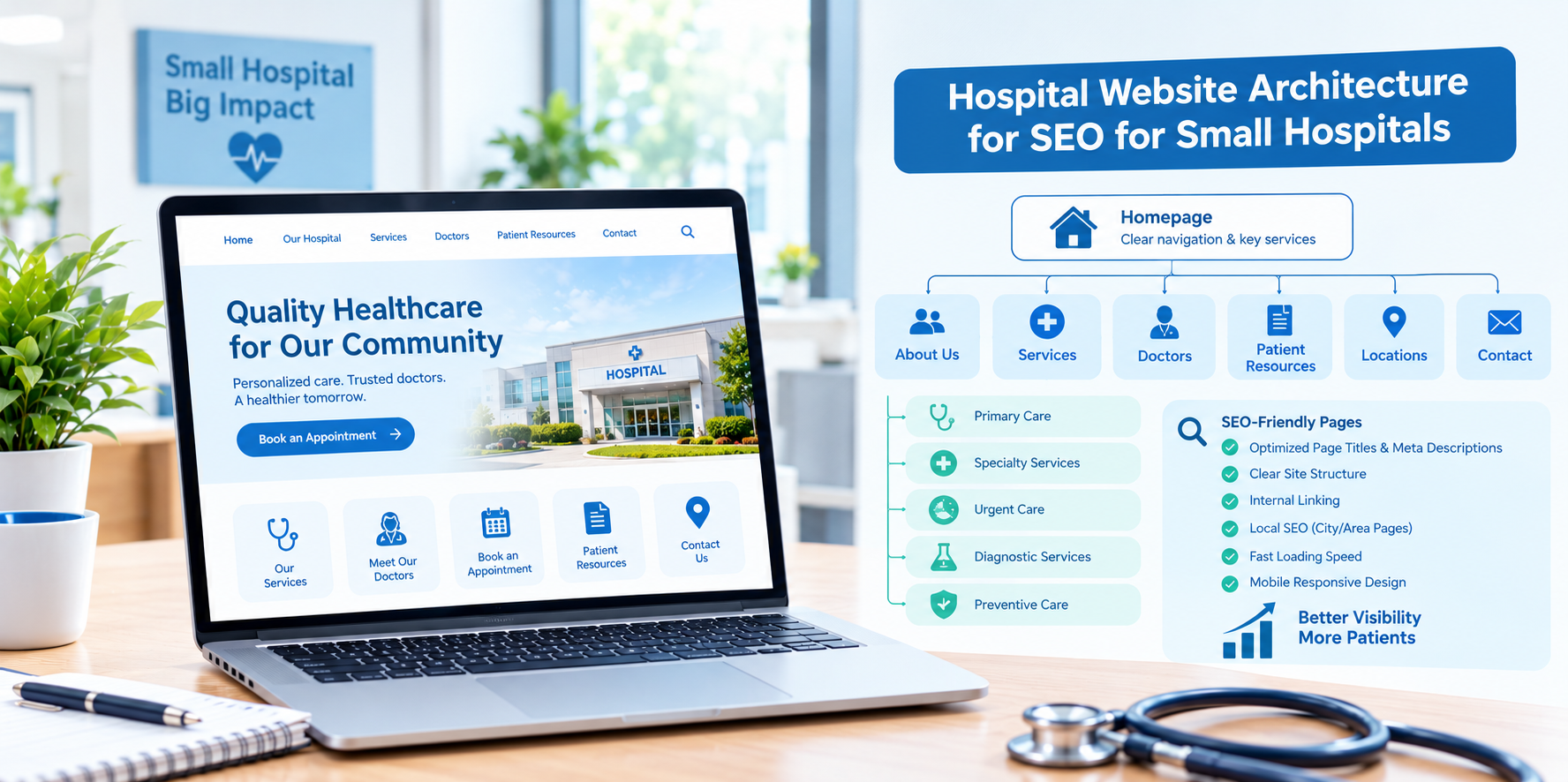
A small hospital often has the same patient needs as a large one but a fraction of the web budget. It may be a community hospital, a critical access facility or a regional hospital with a few clinics, and its website was probably built in stages, with pages added as needs arose. The result is a structure that makes sense to the people who built it but not always to patients or search engines. Website architecture is the underlying plan: how pages are grouped, named, linked and reached. Getting it right is one of the most effective, lowest-cost SEO investments a small hospital can make.
This guide explains hospital website architecture for SEO in plain language, with a practical blueprint small hospitals in the USA can follow to improve findability, patient experience and search performance.
What Is Website Architecture?
Website architecture is the way your site is organized: the hierarchy of pages, the URLs, the menus, the internal links and the relationships between content. A clear architecture helps patients quickly find care, helps search engines understand and index your pages and makes it easier for your team to maintain the site over time.
Why Small Hospitals Benefit Most From a Clear Structure
- Limited team time: A logical structure reduces the effort needed to update and maintain pages.
- Local competition: Patients choose between your hospital, nearby systems and urgent care centers, often based on what they can find quickly.
- Limited authority online: Smaller organizations have fewer links from other sites, so internal structure matters more.
- Mixed audiences: Patients, families, visitors, referring physicians, job seekers and community members all use the site.
The Blueprint: Five Layers
Layer 1: Home Page
The home page should answer three questions immediately: what care do you provide, where are you and how do I get help or book. Include clear paths to emergency information, find a doctor, services, locations, patient and visitor information and contact details.
Layer 2: Main Hubs
Create a small number of top-level sections that reflect how people think, not how your organization is structured. A strong set for a small hospital often includes:
- Services and specialties
- Find a doctor
- Locations and hours
- Patients and visitors
- Billing and insurance
- Health resources
- About us and community
- Careers
Keep the main menu to roughly five to eight items and use plain labels.
Layer 3: Service Line Pages
Give each major service its own page, such as emergency care, maternity, surgery, imaging, cardiology or rehabilitation. Each page should explain what the service includes, who provides it, where it is offered and how to access it, with links to physicians, locations and booking or contact information.
Layer 4: Detail Pages
Beneath service lines, add detail pages for conditions, treatments, programs and patient guides where they serve real questions. Avoid creating thin pages that do not add value.
Layer 5: Supporting Pages
Physician profiles, location pages, news and events, forms, policies and community resources round out the site. These should link into the service lines and hubs they support.
Keep Important Pages Close to the Surface
Aim for priority pages, like emergency information, key service lines, physician directory and contact, to be reachable within two or three clicks from the home page. Deeply buried pages are harder for patients to find and may be crawled less often by search engines.
URL Structure
Clean, readable URLs support users and search engines. Good habits include:
- Use short, descriptive words separated by hyphens.
- Reflect the hierarchy where it helps, for example /services/orthopedics/knee-replacement.
- Keep URLs stable. Avoid including dates or temporary campaign names for evergreen pages.
- Never include patient information or identifiers in URLs.
- When you must change a URL, redirect the old address to the new one.
Navigation Design
- Use patient language: "Emergency care" is clearer than "Department of Emergency Medicine."
- Make mobile navigation simple: Many visitors search for urgent information on phones.
- Add breadcrumbs: Show the path, such as Home, Services, Cardiology, so visitors know where they are.
- Keep key actions visible: Call, directions, book an appointment and find a doctor should be easy to reach on every page.
- Link emergency guidance clearly: Make sure visitors know to call 911 in emergencies, and offer clear information about the emergency department.
Internal Linking Within the Architecture
- Link service lines to their physicians, locations and related services.
- Link physician profiles to the services and locations where they practice.
- Link location pages to the services offered there, with directions and hours.
- Link educational content to the relevant service line page.
- Use descriptive anchor text that makes sense out of context and for screen readers.
Location and Local SEO Alignment
- Create a dedicated page for each hospital campus and clinic, with accurate name, address, phone, hours and services.
- Match this information exactly with your Google Business Profile and major directories.
- Link Google Business Profiles to the corresponding location pages.
- Add structured data that reflects your organization, locations and services, working with your web provider to keep it accurate.
Technical Foundations That Support Architecture
- XML sitemap: Provide an up-to-date sitemap listing your important pages.
- Mobile-friendly design: Ensure pages work well on all screen sizes.
- Page speed: Compress images and avoid heavy scripts.
- Secure connection: Use HTTPS across the site.
- Accessibility: Follow accessibility best practices so people with disabilities can use the site.
- Consistent templates: Use standard layouts for service, physician and location pages.
A Step-by-Step Redesign or Cleanup Plan
- Take inventory. List every page with its URL, purpose, traffic and last update date.
- Group and prioritize. Sort pages into the five layers and identify the top 10 most important patient pages.
- Remove or merge weak pages. Retire outdated pages and combine duplicates, redirecting old URLs.
- Design the navigation. Draft a simple menu and test it with a few patients or staff members.
- Clean up URLs and redirects. Apply consistent patterns and avoid redirect chains.
- Add internal links. Connect service lines, physicians, locations and content.
- Fix technical basics. Update the sitemap, check mobile performance and review accessibility.
- Launch and monitor. Watch search performance, crawl errors and user behavior, and adjust.
Compliance and Privacy
- Have clinicians review medical content and keep it updated.
- Review tracking and analytics tools on appointment, portal and billing pages with your compliance team.
- Do not publish patient information or stories without written authorization.
- Make sure price transparency, nondiscrimination and other required notices are accurate and easy to find, and confirm requirements with qualified advisors.
This is general information, not legal advice.
Metrics to Track
- Organic traffic and impressions for service line and location pages.
- Click paths from the home page to key pages.
- Calls, direction requests and appointment requests.
- Crawl errors, broken links and orphan pages.
- Mobile usability and page speed.
- Bounce and exit rates on key pages.
Common Mistakes
- Organizing the site by internal departments instead of patient needs.
- Too many menu items. Overloaded menus overwhelm visitors.
- Orphaned or outdated pages.
- Changing URLs without redirects.
- Ignoring mobile users.
- Neglecting accessibility.
Final Thoughts
For a small hospital, good website architecture is about clarity: a simple hierarchy, patient-friendly navigation, clean URLs and consistent internal links. Start with an inventory, build around patient needs and keep improving over time. If you would like help planning or improving your hospital's website architecture for SEO, Nova Reach Digital can help you design and implement it.
Frequently Asked Questions
Keep reading
Healthcare Internal Linking Strategy for Multi-Location Hospitals
How multi-location hospitals can build an internal linking strategy that connects locations, service lines and physicians, avoids page cannibalization and improves healthcare website SEO.
Healthcare Internal Linking Strategy for Private Hospitals
How private hospitals can use internal linking to build service line hubs, connect physicians and practical information, and guide patients from research to appointment while improving healthcare website SEO.
Healthcare Internal Linking Strategy for Specialty Clinics
How specialty clinics can use internal linking to connect conditions, treatments and providers, build topical depth and guide patients from research to consultation while improving healthcare website SEO.
Put These Ideas to Work with NovaReach
Automate your marketing, launch AI voice agents, and keep every lead moving, all from one dashboard.