How Does Healthcare Website Accessibility Protect Patients and Rankings? Reading the Accessibility Checks, the Five Steps and the Sample Issue Reduction
A question-and-answer guide to healthcare website accessibility: why sites fail checks, 5 steps from testing to quarterly review, a common problem vs better practice table, a sample issue graph, legal cautions and FAQs.

Healthcare website accessibility means building your website so that people with visual, hearing, motor or cognitive disabilities can read, navigate and book care, following standards such as the Web Content Accessibility Guidelines (WCAG). In the United States, accessibility is also a legal and trust issue, and many of the same fixes make pages clearer for search engines and for every patient on a phone. This guide explains, in a question-and-answer format, how clinics can improve accessibility in five steps, with a sample result and a compliance checklist. It is organic, practical and based on fixing your own pages.
Key Findings
- 5 steps improve accessibility: an automated and manual check, fixes for text and images, accessible forms and booking, keyboard and mobile testing, and a regular review.
- In the illustrative model below, accessibility issues per key page fall from 14 to 1 when all five steps are in place.
- Forms and booking buttons matter most in the sample, because a patient who cannot book has no next step.
- 4 numbers are enough to track progress: issues per key page, forms that work with a keyboard, images with useful descriptions and complaints received.
- All figures in this article are illustrative examples, not guaranteed results, and this article is not legal advice.
What Is Healthcare Website Accessibility?
It is the practice of making sure every patient can use your website, whatever their abilities or devices. It covers readable text, strong color contrast, descriptions for images, captions for video, clear headings, forms that work with a keyboard or screen reader and buttons that are easy to tap. Many of these points overlap with SEO, such as the structure in our guide to fixing page headings and the checks in a healthcare SEO audit.
Why Do Many Healthcare Websites Fail Accessibility Checks?
Most failures come from small, repeated mistakes on templates. Common causes include:
- Images and icons without text descriptions.
- Low contrast between text and background, especially on buttons and banners.
- Forms without clear labels or error messages.
- Menus, pop-ups and booking widgets that cannot be used with a keyboard.
- Videos without captions, which affects healthcare video SEO as well.
How Can Clinics Improve Healthcare Website Accessibility? 5 Steps
1. Run an Automated and a Manual Check
Automated tools find some issues, and human testing finds the rest. Check your top pages: home, service pages, location pages, provider pages and the booking path. Test with a keyboard only and with a screen reader, and note every issue by page and template.
2. Fix Text, Headings and Images
Start with the basics that help every reader. Use a clear heading order, readable font sizes, strong contrast and short paragraphs. Write useful descriptions for informative images and leave decorative images empty. This also supports FAQ pages and the page structure in our website blueprint for small hospitals.
3. Make Forms and Booking Accessible
A patient must be able to book without help. Add visible labels, clear error messages, large tap targets and a phone number as a fallback. Keep the form short, as recommended in our guide to healthcare landing pages.
4. Test on Keyboard, Mobile and Slow Connections
Real patients use many devices. Test that menus, buttons and pop-ups work with a keyboard, that text can be enlarged without breaking the layout and that pages work on a phone. Follow the same template-first approach used for titles at scale, so one fix improves many pages.
5. Publish an Accessibility Statement and Review Quarterly
Be open about your commitment and give patients a way to ask for help. Add a short statement with a contact method, and review accessibility every quarter and after any redesign. Check that provider pages and new content follow the same rules.
| Area | Common problem | Better practice |
|---|---|---|
| Images | No description | Useful text for informative images |
| Color and text | Low contrast, tiny font | Strong contrast and readable sizes |
| Forms | Unlabeled fields and unclear errors | Visible labels, clear errors and a phone fallback |
| Navigation | Keyboard traps and hidden menus | Keyboard-friendly menus and widgets |
| Media | Video without captions | Captions and transcripts |
How Many Issues Can Fixes Remove? A Sample Graph
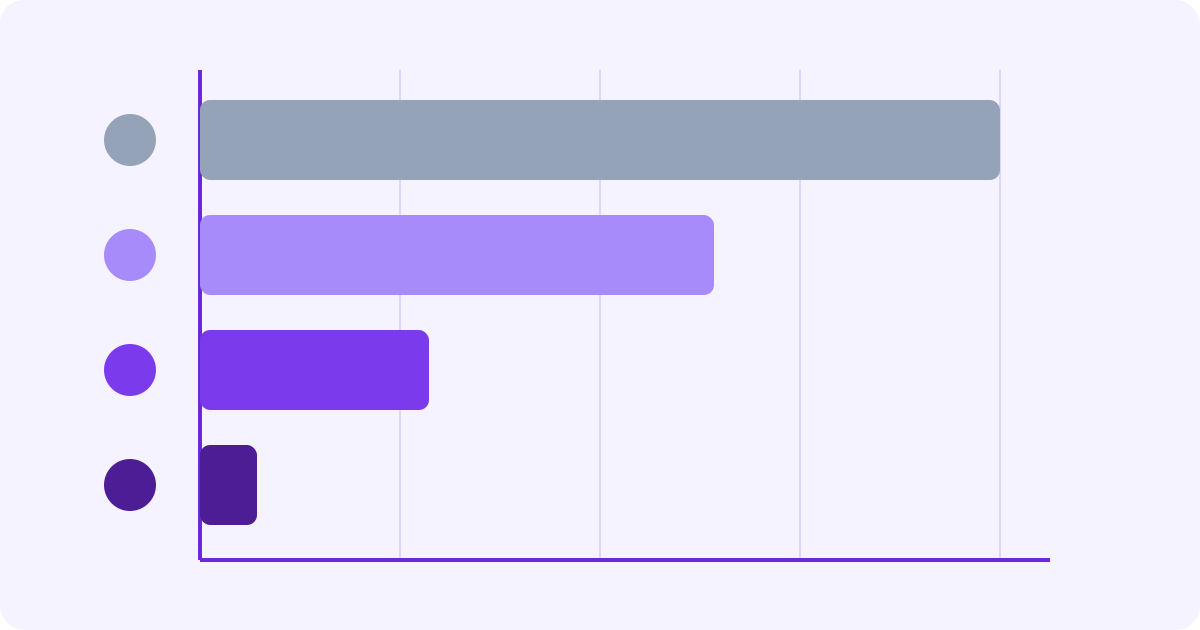
In this illustrative example for a three-location clinic, accessibility issues per key page fall from 14 to 1. The bars run from top to bottom in the same order as the table below, and each block (█) equals 1 issue.
| Stage | Issues per key page | Bar chart |
|---|---|---|
| Before any check | 14 | ██████████████ |
| After text, heading and image fixes | 9 | █████████ |
| After form and booking fixes | 4 | ████ |
| After keyboard and mobile testing and quarterly review | 1 | █ |
What Should Clinics Measure for Accessibility?
Four measures show whether more patients can use the site.
- Number of issues per key page and per template.
- Percentage of forms and booking steps that work with a keyboard.
- Percentage of informative images with useful descriptions and videos with captions.
- Patient accessibility requests and complaints, and how fast they are resolved.
What Rules and Cautions Apply?
Accessibility has legal and ethical sides, so a clear process matters.
- Healthcare providers in the United States may have obligations under laws such as the Americans with Disabilities Act and Section 504 of the Rehabilitation Act. Ask your legal advisor which rules apply to you.
- Use WCAG as a practical guide, and do not rely on an overlay tool alone to fix issues.
- Keep a phone, email and in-person option for patients who need help.
- Do not remove patient-friendly content to avoid fixing it.
- Document your checks and fixes.
Methodology and Limitations
The numbers in this article come from an illustrative model created by Nova Reach Digital to show how each step may reduce accessibility issues. They are not drawn from a published study or a specific website, and no tool or process can guarantee full compliance. Results depend on your site, templates, content and testing. This article is general information and not legal advice.
Related Reading
- Website architecture for multi-location hospitals
- Specialty clinic site architecture
- Healthcare AI Overviews guide
- Patient testimonials
- Healthcare brand awareness
Conclusion
An accessible site welcomes every patient and usually performs better for everyone. Check your key pages, fix templates first and review every quarter. If you want help improving healthcare website accessibility, contact Nova Reach Digital or read more about our healthcare marketing services.
Get Directions
Frequently Asked Questions
Keep reading
What Are the Top Email Marketing Automation Tools for Small Businesses? Reading the Tool Comparison, the Five Steps and the Sample Email Bookings
A question-and-answer guide to choosing among the top email marketing automation tools for small businesses: what they do, why programs underperform, 5 steps, a weak vs stronger table, a sample bookings chart, rules and FAQs.
What Are the Top Social Media Automation Tools for Small Businesses? Reading the Tool Comparison, the Five Steps and the Sample Posting Time
A question-and-answer guide to choosing among the top social media automation tools for small businesses: what to automate, why accounts feel robotic, 5 steps, a weak vs stronger table, a sample time-savings chart, rules and FAQs.
How Do You Choose Among the Top Digital Marketing Agencies in NYC? Reading the Agency Types, the Five Steps and the Sample Cost Per Customer
A question-and-answer guide to choosing among the top digital marketing agencies in NYC: what agencies do, why businesses switch, 5 steps to choose, an agency-types table, a sample cost-per-customer chart, rules and FAQs.
Put These Ideas to Work with NovaReach
Automate your marketing, launch AI voice agents, and keep every lead moving, all from one dashboard.