How Can Clinics Use Google Search Console to Grow Organic Visits? Reading the Query Reports, the Five Steps and the Sample Click Growth
A question-and-answer guide to using Google Search Console for healthcare SEO: why clinics get little value from it, 5 steps from setup to a monthly report, a weak vs strong table, a sample clicks graph, privacy cautions and FAQs.

Google Search Console is a free tool from Google that shows how your website appears in search results, which searches bring visitors, which pages are indexed and what problems stop pages from appearing. For a clinic or hospital, it is the most direct source of organic search data, yet many teams never open it or only check total clicks. This guide explains, in a question-and-answer format, how to set up and use Search Console in five steps to grow organic visits and appointment requests, with a sample result and privacy cautions. It is entirely organic.
Key Findings
- 5 steps turn Search Console into a growth tool: correct setup, a review of top pages and queries, an indexing check, content and snippet updates and a monthly report.
- In the illustrative model below, organic clicks per month to priority service pages rise from 1,200 to 3,100 when all five steps are in place.
- Query review gives the biggest lift in the sample, because it shows which searches almost bring patients and where a page or title can improve.
- 4 numbers are enough to track progress: clicks, impressions, average position and click-through rate for priority pages.
- All figures in this article are illustrative examples, not guaranteed results.
What Is Google Search Console and Why Does It Matter for Healthcare?
It is the place where Google tells you how it sees your site. It shows impressions (how often your pages appeared), clicks, average position, the search queries involved and issues such as pages that are not indexed or load slowly on a phone. It supports every other organic task, such as a healthcare SEO audit, keyword research and FAQ pages.
Why Do Many Clinics Get Little Value From Search Console?
Most clinics set it up once and never act on what it shows. Common causes include:
- The wrong site version or only part of the site is verified.
- Only the total number of clicks is checked, with no view by page or query.
- Pages with many impressions but few clicks are never improved.
- Indexing and mobile warnings are ignored.
- Nobody owns a monthly review, so patterns are missed.
How Can Clinics Use Search Console to Grow Organic Visits? 5 Steps
1. Set Up and Verify Correctly
Make sure the data covers your whole site. Verify the domain, submit your sitemap and give access to the right people, such as your marketing lead and web developer. Keep access limited and review users every quarter.
2. Review Top Pages and Queries
Start with the pages that matter to patients. Filter for your priority services and locations, and list the queries that bring impressions and clicks. Look for searches where you appear on page two or have low click-through, because small improvements there can bring new visits. Compare the queries with your title tags and meta descriptions.
3. Check Indexing and Page Experience
A page that is not indexed cannot bring visitors. Review the pages report to see which key pages are excluded or have errors, and check mobile and speed warnings. Fixes often apply to templates, as explained in our guides to title tags at scale and website architecture.
4. Update Content and Snippets From What You Learn
Use the data to decide what to change. Rewrite a title that does not match the query, add a missing question to a service page, create a new provider page for a doctor people search for by name or improve a page headline, as covered in fixing headings for small hospitals. Change one thing at a time and note the date.
5. Build a Simple Monthly Report
A one-page report keeps the work visible. Record clicks, impressions, click-through rate and average position for priority pages and top queries, add notes on changes and share it with leaders. Combine it with your Google Maps and brand awareness numbers.
| Step | Weak use | Strong use |
|---|---|---|
| Setup | Partial site, wrong users | Verified domain, sitemap and limited access |
| Review | Total clicks only | Pages and queries for priority services |
| Indexing | Warnings ignored | Indexing and mobile issues fixed by template |
| Updates | Random edits | Changes based on queries, dated and tracked |
| Reporting | None | One-page monthly report |
How Many Clicks Can Better Use of Search Console Add? A Sample Graph
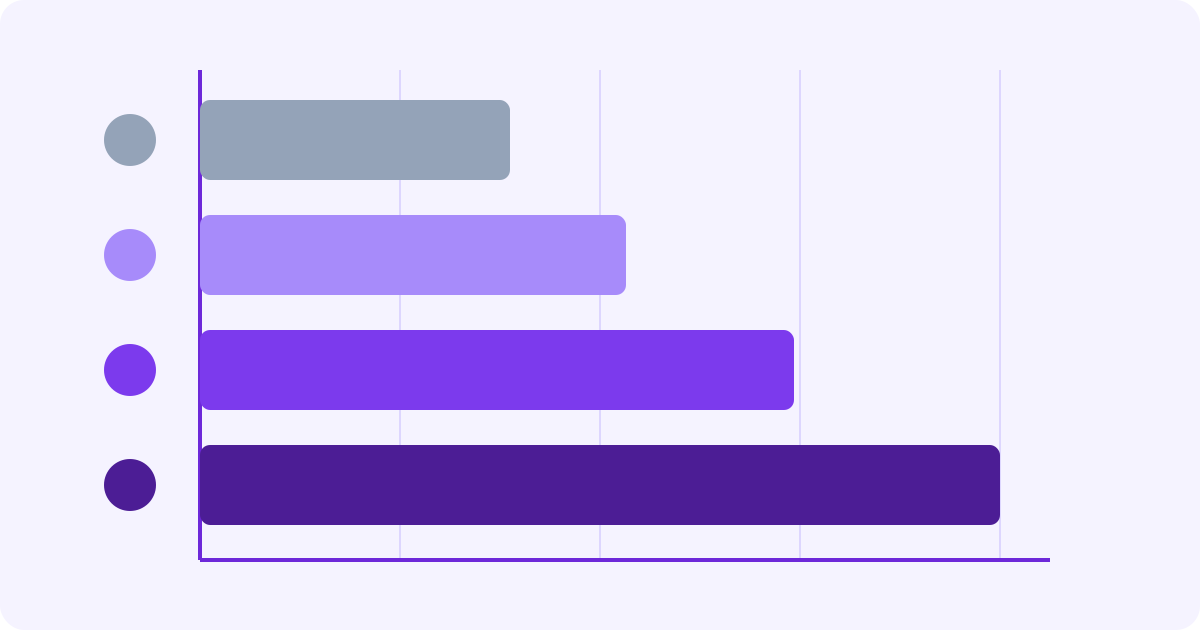
In this illustrative example for a multi-location clinic, organic clicks per month to priority service pages rise from 1,200 to 3,100. The bars run from top to bottom in the same order as the table below, and each block (█) equals about 200 clicks.
| Stage | Organic clicks per month | Bar chart |
|---|---|---|
| Search Console not used | 1,200 | ██████ |
| Plus correct setup and indexing fixes | 1,650 | ████████ |
| Plus query review and snippet updates | 2,300 | ████████████ |
| Plus content updates and a monthly report | 3,100 | ████████████████ |
What Should Clinics Measure in Search Console?
Four measures show whether organic visibility is growing.
- Clicks and impressions for priority service, location and provider pages.
- Click-through rate for your top queries, and pages where it is below what similar pages achieve.
- Average position for your top ten service and location searches.
- Number of key pages indexed and number of open indexing or mobile issues.
Connect these numbers to bookings in your analytics, as described in our guide to healthcare landing pages.
What Privacy and Data Cautions Apply?
Search Console shows aggregate search data, but good habits still matter.
- Limit access to staff and partners who need it, and remove users who leave.
- Do not copy search data into notes together with patient information.
- Do not publish screenshots that show private pages, staging sites or internal URLs.
- Check that your analytics and tracking tools follow HIPAA and your privacy policy.
- Do not use the data to claim guaranteed rankings or results.
Methodology and Limitations
The numbers in this article come from an illustrative model created by Nova Reach Digital to show how each step may affect organic clicks. They are not drawn from a published study or a specific website, and no one can guarantee rankings or traffic. Real results depend on competition, content quality, site health and how consistently changes are made. This article is general information and not legal advice.
Related Reading
- Healthcare link building
- Healthcare video SEO
- Insurance accepted pages
- Healthcare AI Overviews guide
- Local citations and NAP consistency
Conclusion
Search Console shows how patients find you and where you can improve, without any extra cost. Set it up well, review your priority pages and queries each month and act on what you learn. If you want help with healthcare SEO reporting, contact Nova Reach Digital or read more about our healthcare marketing services.
Get Directions
Frequently Asked Questions
Keep reading
What Are the Top Email Marketing Automation Tools for Small Businesses? Reading the Tool Comparison, the Five Steps and the Sample Email Bookings
A question-and-answer guide to choosing among the top email marketing automation tools for small businesses: what they do, why programs underperform, 5 steps, a weak vs stronger table, a sample bookings chart, rules and FAQs.
What Are the Top Social Media Automation Tools for Small Businesses? Reading the Tool Comparison, the Five Steps and the Sample Posting Time
A question-and-answer guide to choosing among the top social media automation tools for small businesses: what to automate, why accounts feel robotic, 5 steps, a weak vs stronger table, a sample time-savings chart, rules and FAQs.
How Do You Choose Among the Top Digital Marketing Agencies in NYC? Reading the Agency Types, the Five Steps and the Sample Cost Per Customer
A question-and-answer guide to choosing among the top digital marketing agencies in NYC: what agencies do, why businesses switch, 5 steps to choose, an agency-types table, a sample cost-per-customer chart, rules and FAQs.
Put These Ideas to Work with NovaReach
Automate your marketing, launch AI voice agents, and keep every lead moving, all from one dashboard.